
Website Project Planning: A Step-by-Step Guide
What's new: New sections on accessibility law, Core Web Vitals, OWASP Top 10:2025, platform choice, cost data, a risk register, launch planning and AI, plus a checklist and FAQ.
Summarize with AI
Read summarized version with AI
- Most website projects go wrong before development starts: unclear goals, late content, too many approvers and no budget for maintenance.
- Write 2026 requirements into the plan from day one: WCAG 2.2 AA (the European Accessibility Act has applied since 28 June 2025), Core Web Vitals targets, the OWASP Top 10:2025 and privacy by design.
- Build a work breakdown structure and estimate bottom-up. Clutch data shows a typical web project costs under $10,000, yet the average is $66,499, so averages mislead.
- Keep a risk register and a launch plan with a redirect map, backups and a rollback; a relaunch without redirects can lose search traffic built up over years.
- AI speeds up prototypes, code and drafts, but review, testing and editorial judgment must keep pace. Google says AI Overviews need no special optimization beyond good fundamentals.
A website project rarely fails in development. It fails earlier, when nobody agreed what the site is for, who approves the content, which legal requirements apply or what the budget really covers. A website project plan fixes that before the first line of code.
This guide walks through website project planning step by step: discovery, the requirements a 2026 website has to meet, platform choice, a work breakdown structure, cost, risk, timeline, approvals, launch and maintenance. It ends with a checklist you can copy into your own plan. We first published it in 2021 and have rewritten it for 2026, with new sections on accessibility law, performance, security, AI and cost.
Why plan a website project at all?
Every business needs a website to present its services, sell products and inform customers. A good website is not only a design problem. It is a project with dependencies, approvals and risks, and it needs a plan like any other.
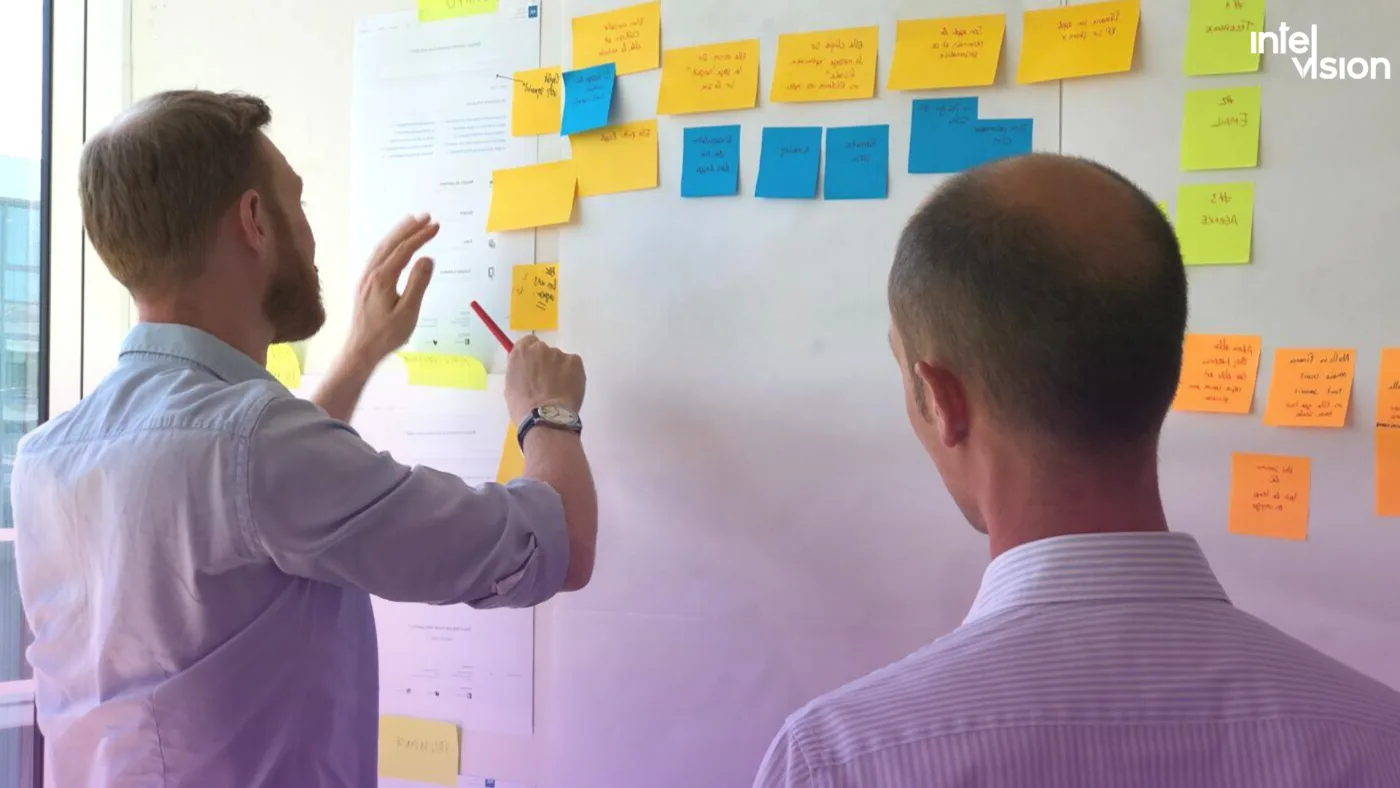
Many pitfalls can be avoided by deciding early who belongs on the team. Most companies hand the website to IT. IT is vital for the technical side, but a business website is a communication tool first. UI and UX designers, marketing and communication specialists and a project manager should all be involved. Marketing knows which products to highlight and what information matters most to customers. The bigger the organization, the more deliberately you need to connect these people with the technical team.
It is also easy to assume that once a site is online, you can leave it alone. Like all technology, a website needs regular updates and, eventually, a rebuild when the platform, the design or the content model no longer fits the business. Plan for that from day one.

Finally, decide on your budget before you start. A website is never truly finished: you can always improve search, layout or speed. Knowing your budget and timeline in advance lets you allocate resources to what matters most and stick to the plan.
Step 1: Define the project and run discovery
Discovery is the stage where you decide what website you need before anyone starts building it. Once you know the functions and features the site should have, you can research them properly. Discovery covers the goal and functionality of the site, the audience, the team and the budget.
Answer these questions in writing:
- Objective. What is the website for? An online shop, a lead generation site, a product's marketing site, a customer portal or a publication? Try to state its essential job in one sentence.
- Success metrics. How will you know it works? Qualified leads per month, online revenue, support tickets avoided, sign-ups. Pick two or three, and record today's baseline.
- Audience. Who will use the site? Internal staff, customers, partners, investors, job candidates? What do they need to do, and on which devices? Check your analytics for the current device split rather than guessing.
- Team. Who will work on the site? Do you need external help or new hires? Who does what, and when? Put one project manager in charge and give everyone clear responsibilities. Smaller businesses, where people juggle several roles, often underestimate how much of their own time a website takes, even with an external partner.
- Timeline. When must the site be ready, and why? Will you release in iterations or all at once? Time affects every other factor: if the site must be fast and good, it will cost more.
- Content. Which pages and assets exist, who writes the new ones, and who approves them? Content is the most common cause of late launches, so treat it as a workstream with its own owner and deadlines.
- Integrations. CRM, marketing automation, payments, ERP, booking, single sign-on, analytics. Each integration is a dependency with its own risk.

Once you have defined the who, the what and the how, collect references and a mood board so that everyone shares the same picture of the result. Then decide whether the work will be done by your in-house team or with an external partner. If the decision is large or hard to reverse, such as replatforming a revenue-critical site, a paid discovery phase with a costed recommendation is cheaper than finding out halfway through the build. That is the purpose of our Deep Discovery service.
Step 2: Set the requirements a 2026 website has to meet
Several requirements are no longer optional. Write them into the plan now, because adding them after launch is far more expensive.
Accessibility
The European Accessibility Act has applied since 28 June 2025. It covers consumer-facing services such as e-commerce, online shops and platforms, banking and passenger transport, so many company websites and apps that sell to consumers in the EU must now be accessible. According to law firm Noerr's summary, microenterprises with fewer than ten employees and no more than EUR 2 million in annual turnover or balance sheet total are exempt, the harmonized standard EN 301 549 creates a presumption of conformity, and Germany's implementing law allows fines of up to EUR 100,000 per infringement. EN 301 549 references the Web Content Accessibility Guidelines; the current version is WCAG 2.2, which added nine success criteria to WCAG 2.1. Check with your lawyer which obligations apply to you, then make WCAG 2.2 level AA your design and testing target.
Performance
Speed affects conversions and search visibility. Google's Core Web Vitals define "good" as a Largest Contentful Paint of 2.5 seconds or less, an Interaction to Next Paint of 200 milliseconds or less and a Cumulative Layout Shift of 0.1 or less, measured at the 75th percentile of page loads on mobile and desktop. INP replaced First Input Delay as a Core Web Vital in 2024, so older performance budgets may be out of date. Put these thresholds into your acceptance criteria.
Security
Use the OWASP Top 10:2025 as a minimum checklist. Broken access control is still the top risk, and software supply chain failures are now third, which matters for any site built on plugins, themes and third-party packages. Plan who updates dependencies, how often, and how you will know when a plugin has a known vulnerability.
Privacy
Decide early which analytics, marketing and chat tools you will use, what personal data each collects, where it is stored and how consent is handled. Under the GDPR, privacy has to be designed in, not bolted on. Retention matters too: on an EdTech platform we work on, an engineer built automatic GDPR-compliant deletion of personal attachments after one year as a deliverable in its own right.
Search, including AI features
Plan URL structure, internal linking, metadata and structured data from the start. For AI Overviews and AI Mode, Google states that there are no additional requirements or special optimizations: pages need to be indexable and eligible for a snippet, structured data should match the visible text, and the content should be helpful, reliable and people-first. In other words, the fundamentals now matter more, not less.
Step 3: Choose the platform and build approach
Platform choice drives cost, speed of change and who can edit the site. WordPress still runs 39.6% of all websites, according to W3Techs data from October 2026, followed by Shopify (5.3%), Wix (4.2%) and Squarespace (2.4%), while 32.1% of sites use none of the systems W3Techs monitors. Popularity is not the same as fit, so match the approach to the job:
| Approach | Fits when | Watch out for |
|---|---|---|
| Hosted website builder | A small brochure site or simple shop, a small budget, non-technical editors | Limited integrations and control; migration later can be costly |
| WordPress or a similar CMS | Content-heavy marketing sites, many editors, a large plugin ecosystem needed | Plugin sprawl, security updates, performance tuning |
| Headless CMS with a front-end framework | High performance needs, several channels, complex design systems, a developer team to maintain it | Higher build cost; editors need a good preview setup |
| Custom web application | Portals, booking, configurators, logged-in customer areas, heavy business logic | Needs product management, QA and long-term engineering ownership |
Many projects combine approaches: a CMS for marketing pages and a custom application for the logged-in area. If your site is closer to a web application, our guide to the technology stack for web application development goes deeper, and the e-commerce website development guide covers online shops.
Step 4: Build a work breakdown structure (WBS)
A good first step in drafting a project plan for building a website is a work breakdown structure. It breaks the project down into tasks, then into subtasks. For each one you define the deliverable, the owner, the estimate, the cost and the dependencies. Together they form the backbone of your website project plan. A website project plan template can help you start, but a plan customized to your project works better.

A typical WBS for a mid-sized company website looks like this:
- Discovery: stakeholder interviews, analytics review, content inventory, requirements, success metrics
- Information architecture: sitemap, page types, navigation, URL and redirect plan
- Design: wireframes, design system, key page designs, accessibility review
- Content: copywriting, imagery, translations, legal pages, SEO metadata
- Development: environments, CMS setup, templates and components, integrations, forms
- Quality assurance: functional testing, cross-browser and device testing, accessibility and performance testing, security checks
- Launch: content migration, redirects, analytics and consent, DNS, monitoring, backups
- Post-launch: bug fixing period, training for editors, maintenance plan
Next, arrange the tasks in the order they need to be completed. Done well, this gives you a solid understanding of the project and a first estimate of the total work and time. You can then follow the WBS all the way to launch.
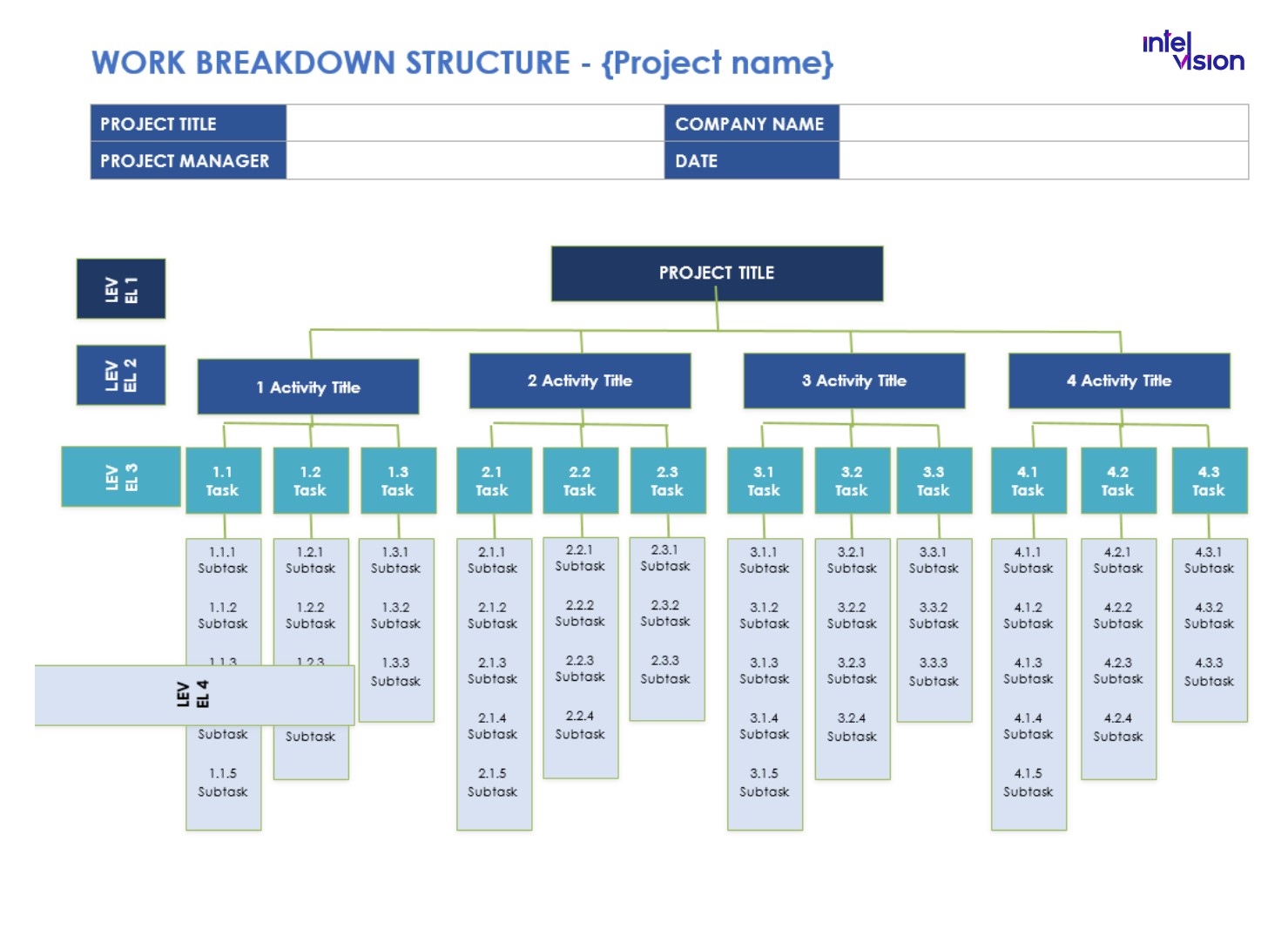
A usable WBS needs experience in website development and familiarity with the technical details, but also an understanding of how long the creative work takes. Content and design approvals usually take longer than anyone expects. Getting that balance right is difficult, and very rewarding.
Step 5: Estimate the cost and set the budget
Website budgets vary by two orders of magnitude, so be careful with averages. Clutch's web development pricing data, compiled from verified client reviews and updated in September 2026, shows:
- a typical project costs less than $10,000
- the average project cost is $66,499 and the average timeline is 9 months, so a few large builds weigh heavily on the averages
- the average hourly rate is $25 to $49, with $100 to $149 typical in the United States, Canada and Australia, $50 to $99 in Poland, and $25 to $49 in Ukraine, Spain and Mexico
Rather than starting from an average, estimate bottom-up from your WBS:
- Estimate hours per WBS item, by role, as a range rather than a single number.
- Multiply by the rate for each role.
- Add the costs that are not development: content, photography, translation, licenses, hosting, third-party services and your own team's time.
- Add a contingency based on the risks in your risk register, not a flat guess.
- Add the first year of maintenance and hosting, so the total reflects the cost of owning the site, not just launching it.
Fixed price works when the scope is stable and well specified. Time and materials works better when you expect to learn and change during the project. Either way, agree in writing what happens when the scope changes.
Step 6: Write a risk management plan
"Be prepared for the unexpected" sums up the problem with risk management: how do you prepare for something you cannot foresee? That should not stop you from assessing the risks you can see. With the WBS in hand, you can ask which tasks carry which risks and assign time to reduce them.

Say you update your website and the site goes offline after the release. How do you roll back to the previous version? How quickly can the site be restored if a server fails or loses data? Where are the backups of your customer data if a fault deletes them? Who starts the recovery procedure? If you only think about this once the site is down, you lose valuable time in which nothing works.
Keep a simple risk register with the risk, likelihood, impact, owner and mitigation for each line. The risks we see most often on website projects:
| Risk | Mitigation |
|---|---|
| Content arrives late | Content owner and deadlines in the plan; design with real content, not placeholder text |
| Scope grows during the build | A written change process; new requests go into a backlog for the next release |
| Search traffic drops after relaunch | A full redirect map from old to new URLs, tested before go-live; monitoring in Search Console after launch |
| An integration fails or is slower than expected | Test integrations early with real accounts; agree a fallback, such as a manual export |
| Accessibility or performance targets are missed | Test against WCAG 2.2 AA and Core Web Vitals during development, not only before launch |
| A vulnerable plugin or package | Keep dependencies minimal, update on a schedule, scan regularly |
| A key person leaves | Documentation, shared access, no single person holding all credentials |

You might get lucky: no issues during the project, no backup ever needed. But would you bet your business on it?
Step 7: Create the timeline
Build the timeline on the business's priorities, and handle dependencies ahead of time. A good timeline includes not only development, but also testing and bug fixing, so every deliverable reaches the required quality.
Phases overlap, but the order stays the same:
Design
A good website starts with research by a UI or UX designer, either in-house or from an external partner. The designer turns the requirements and goals into wireframes, then into designs. Everyone involved should review the wireframes carefully, so no confusion exists between the different sides. Design key templates with real content and check accessibility at this stage, when changes are cheap.
Development
Development takes the most time, but if the previous steps were done well, the timeline follows from assigning WBS items to people. You can shorten it by having several people or teams work in parallel on different parts, for example templates, integrations and content migration, depending on the resources you can allocate. Ship to a staging environment early and often, so stakeholders review working pages rather than screenshots.

Testing
Plan testing as its own phase with its own time: functional tests, devices and browsers, forms and integrations, accessibility, performance against your Core Web Vitals targets, and a security check. Automate what you will run again after every release.
Release and review
Plan enough milestones with the client or stakeholders to review progress. On some projects the review happens only at the end, but in general you should review intermediate results to avoid surprises. It costs some time, and it builds confidence in the final product because people see it take shape.
Support and maintenance
After acceptance and release, agree on a support period or a number of support hours to catch less obvious bugs and answer remaining questions. Then plan regular maintenance, so the site stays secure, fast and up to date.
A word on dates: Clutch's reviewed web projects average 9 months, and that average mixes small sites with large platforms. Build your own timeline from the WBS, then add buffer where your risk register says you need it.
Step 8: Agree how you share information and approve work
If you are an external partner building a website for a business, keep the client up to date on all progress. That is how we work: clear communication with the client throughout the project.

Appoint a single point of contact on each side, so questions are answered quickly. On larger projects one person may not be enough, but each decision still needs one owner. Both sides must respond fast and share information openly. Communicate progress and obstacles transparently, and have the responsible people approve progress at each milestone. Nothing is worse than a rejected final delivery, and when it happens, both sides are usually equally to blame.
To avoid it:
- set clear communication channels and a fixed meeting rhythm
- write acceptance criteria for each deliverable before work on it starts
- agree a definition of done that includes testing, accessibility and content
- name who approves design, content and technical decisions
- be open about problems, delays and issues as soon as they appear
If you are the client, follow the project closely. That does not mean micromanaging every step, but it does mean paying attention.
Step 9: Plan the launch, migration and maintenance
Launch is a project phase, not a button. A launch plan covers content migration, the redirect map, analytics and consent, DNS and certificates, monitoring, backups and a rollback plan, plus a named person on call for the first days after go-live.
If you are replacing an existing platform, migrate in a sequence that limits risk. On the EdTech platform mentioned above, the team moved the checkout from WordPress and WooCommerce to Next.js with Mollie payments in about four weeks, deliberately starting with the most complex part, because checkout touches payments, legal requirements, coupon logic and user data at once.
After launch, maintenance keeps the site healthy. For WallaWalla, a game art and development studio, one full-stack developer handled ongoing maintenance, regular security scans and SEO, and improved site performance by 30% by optimizing images, reducing load times and minifying code. If you do not have that capacity in-house, plan it as a service from the start, for example through support and maintenance.
How AI changes website projects in 2026
AI tools now touch almost every phase of a website project. Used well, they shorten the work. Used carelessly, they move the cost to review and rework.
- Discovery and design. AI can summarize interviews, draft sitemaps and produce clickable prototypes in hours. Treat the output as a starting point for decisions people still have to make.
- Development. AI coding assistants are mainstream. In the 2026 Stack Overflow Developer Survey, 73% of respondents who use AI coding assistants or agents use them daily, and 93% say source attribution is needed to trust AI output. Plan for code review and testing to keep pace with faster code generation.
- Content. AI can draft and translate, but your content must still be accurate, original and useful. Google's guidance for AI features rewards helpful, reliable, people-first content, so editorial review stays in the plan.
- AI features on the site. A chat assistant, smart search or personalization is a product feature with its own data, privacy and quality questions. Scope it like one, with a source of truth, logging and a way for a human to step in.
Our AI implementation work covers building AI features into real products and workflows, once the data behind them is proven.
Common website planning mistakes
- Starting with the design. Without agreed goals, audience and content, design reviews turn into debates about taste.
- Treating content as an afterthought. Late content delays launches more than late code.
- Leaving accessibility, performance and security to the end. Each is cheaper to build in than to retrofit.
- Forgetting redirects. A relaunch without a redirect map can lose search traffic built up over years.
- Budgeting only for launch. Hosting, licenses, updates and improvements cost money every year.
- Too many approvers. When everyone can block, nobody decides. Name one owner per decision.
- No success metrics. Without a baseline, you cannot tell whether the new site is better than the old one.
Website project plan checklist
Use this as a template for your own plan. Every line should have an owner and a date.
- Objective stated in one sentence, with two or three success metrics and a baseline
- Audience, key user tasks and device mix from analytics
- Project manager and decision owners named on both sides
- Content inventory, content owner and content deadlines
- Integrations listed, with an owner and a test plan for each
- Requirements written in: WCAG 2.2 AA, Core Web Vitals targets, OWASP Top 10 checks, privacy and consent
- Platform and build approach chosen, with the reasons recorded
- Work breakdown structure with estimates, owners and dependencies
- Budget covering build, content, licenses, hosting, contingency and the first year of maintenance
- Risk register with owners and mitigations
- Timeline including design, development, testing, review milestones and buffer
- Acceptance criteria and a definition of done
- Launch plan: migration, redirects, analytics, monitoring, backups, rollback
- Maintenance plan and budget after launch
How to build a successful project plan
The steps above take you from the idea of a website to a concrete plan. Do not skip planning and design, and give every relevant part of the business a voice. From there you can break your project plan for website development into clear steps and assess each one for time, cost, risk, dependencies and deliverables.
If you have never done this before, the process can be daunting, and it is worth bringing in people who have. We have built and rebuilt websites and web platforms, from a full WordPress redesign and rebuild for Swiss Scholar to platform modernization. We can help at any step: discovery, design, development, or the engineers to extend your own team. Tell us about your website project, and we will tell you plainly what should happen first.
Sources
- Noerr: Accessibility in e-commerce, new obligations for online shop operators from June 2025
- W3C: Web Content Accessibility Guidelines (WCAG) 2.2
- W3C WAI: What's new in WCAG 2.2
- web.dev: Web Vitals
- OWASP Top 10:2025
- Google Search Central: AI features and your website
- W3Techs: Usage statistics of content management systems
- Clutch: Web development pricing guide
- Stack Overflow: The results of the 2026 Developer Survey are here
Read Intelvision often? Add us as a preferred source in Google Search.
Add to preferred sources