What Is Work Management Software and What Is It Used For? A 2026 Guide
What's new: New market and pricing data, tool list re-checked (Podio now Progress, Microsoft Project retirements), AI agents, a selection process, an FAQ, and Vaillant facts matched to the case study.
Summarize with AI
Read summarized version with AI
- Work management software organizes all of a team's work (tasks, routines, requests and projects) in one shared system, while project management software controls a single project against a plan.
- Teams adopt it because coordination is expensive: Atlassian's 2025 research found teams spend over 25% of the workweek searching for information.
- Gartner calls the market collaborative work management; monday.com, Smartsheet, Wrike and Atlassian each announced Leader placements in the October 2026 Magic Quadrant.
- Paid plans of the main tools list from about $5 to $25 per user per month, plus metered AI credits; calculate five-year cost before you commit.
- AI now summarizes, drafts, triages and runs routine steps, but it depends on clean task data and needs human sign-off where money or compliance is involved.
- Build custom only when integrations, offline field work, data control or your own workflow advantage justify it, as in our Vaillant platform.
Work management software is the system where a team's work lives: what needs doing, who is doing it, by when, in what order and with which files and conversations attached. Done well, it replaces the spreadsheet, the email chain and the weekly status meeting with one shared picture of reality. Done badly, it becomes one more tool nobody updates.
This guide explains what work management software is, how it differs from project management software, what it is used for, which features matter in 2026, what the leading tools cost, how AI agents are changing the category, and when it makes sense to build a custom system instead of buying one. It ends with the internal work management platform our team built for Vaillant.
What is work management software?
Work management software is a category of tools that organizes all of a team's work, not only its projects, in one place. It connects tasks to the people doing them, to deadlines, to the information they need and to the processes they follow, so managers and team members can see and steer work across the whole organization rather than inside a single project.
Gartner, the research and advisory firm, calls this market collaborative work management (CWM), which it describes as "the market for stand-alone software tools that provide task-driven workspaces" used to plan, coordinate and automate work. In its October 2026 Magic Quadrant, Gartner notes that these platforms "increasingly connect team productivity with operational work and AI-supported execution".
In practice, you can manage your team and its workload not only within a project but across every organizational function: a marketing calendar, an onboarding checklist, a monthly finance close, a queue of service orders and a product launch can all live in the same system, with the same people, permissions and reporting.
Why teams adopt it: the hidden cost of coordinating work
Most teams do not buy work management software because they love software. They buy it because coordinating work by hand has become expensive, and the cost is mostly invisible.
- Asana's 2021 Anatomy of Work Index, based on more than 13,000 knowledge workers in seven countries, found that people spent 60% of their day on "work about work": chasing status, searching for information and switching between tools, rather than on the skilled work they were hired for.
- Atlassian's State of Teams 2025 report, based on a survey of about 12,000 knowledge workers and 200 executives, found that teams spend more than 25% of their workweek searching for information. In press coverage of the same research, 50% of workers said their teams had unknowingly worked on the same things, and only 7% of executives said they knew exactly how their teams' work supported company goals.
Both studies come from vendors that sell work management tools, so treat the exact percentages with some caution. The pattern, however, matches what we see in client teams: when nobody can answer "what is the status?" without a meeting, the organization is paying for that question many times a week.
One example from our own work: in a German energy-efficiency consultancy of around 20 people, daily standups had grown to 16 participants, and one part-time contributor was losing 30% of her limited weekly hours to unstructured meetings. Moving task tracking into Jira with written requirements, and cutting standups to the product team, was part of the fix. The full story is in the case study on that engagement.
How work management software works: the six-step cycle
The simplest way to understand what work management software does is to follow one piece of work through its life:
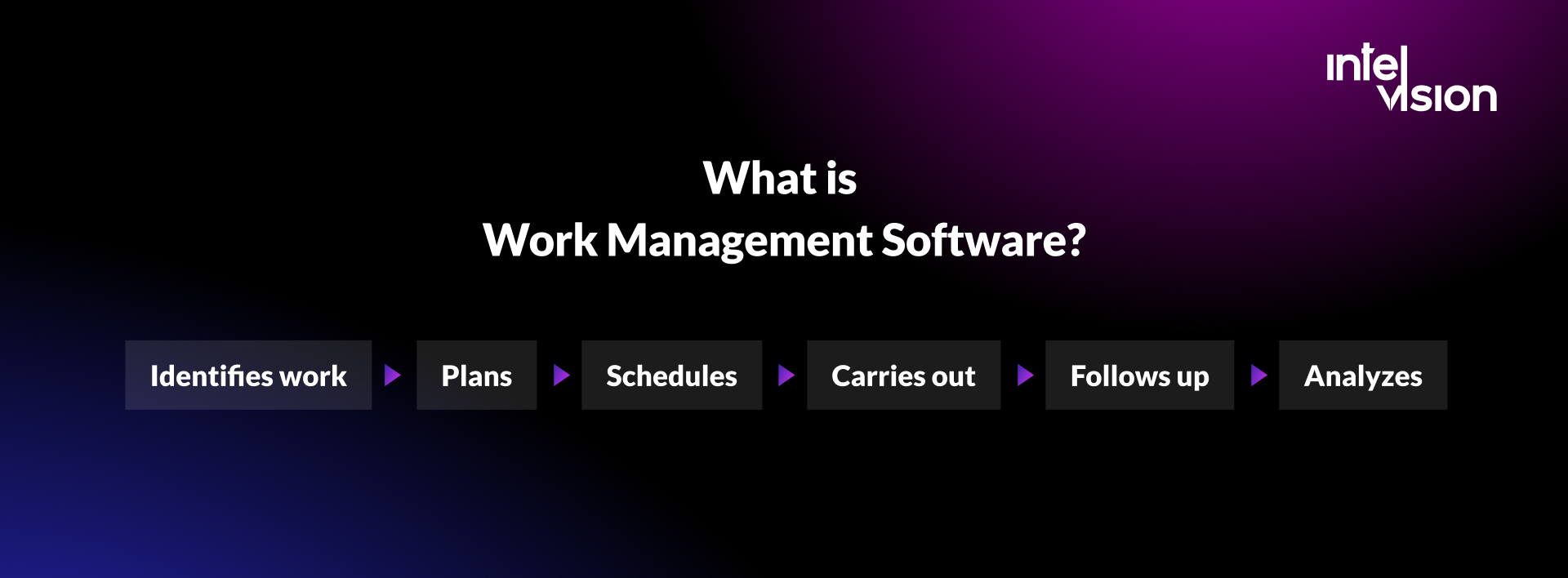
Identify, then plan, then schedule, then carry out, then follow up, then analyze.
Work management software supports all six steps for any business process, whether the work is a one-off task, a recurring routine or a full project.
| Step | What happens | What the software does |
|---|---|---|
| Identify | Work enters the system: a request, an order, an idea, a recurring obligation | Intake forms, email-to-task, integrations that create tasks from other systems, recurring task templates |
| Plan | Work is broken down, sized and assigned | Subtasks, dependencies, templates, owner and priority fields, workload views |
| Schedule | Work gets dates that fit people's real capacity | Calendars, timelines and Gantt charts, resource and capacity planning |
| Carry out | People do the work and collaborate on it | Comments, mentions, file sharing, approvals, mobile access, automations that move work forward |
| Follow up | Progress is checked and blockers are cleared | Status fields, notifications, reminders, Kanban boards, dashboards |
| Analyze | The team learns what worked and what to change | Reports, time tracking, cycle-time and throughput metrics, exports to BI tools |
Scheduling deserves special attention. Good time management covers a large part of a project's success, and it is where spreadsheets fail first: a spreadsheet cannot tell you that the person you just assigned is already booked at 140% next week.
After planning, scheduling and execution, the analysis step closes the loop. You see which workflows and indicators matter, where work waits and where it flows. Because the system holds the whole picture, it becomes easier to plan work and manage a team with one approach to both project and task management. In other words, it creates a digital workplace for every department on one platform, even if your team is spread around the world.
Work management vs project management software
Work management software is often confused with project management software, and the line between them has blurred as vendors have added features. The distinction still matters when you choose a tool.
Project management software controls a single project with a defined start, end, scope and plan. It follows project management methodology: structure the work, set a baseline, track against it. That rigidity is a strength when you are delivering a building, a software release or a migration on a fixed date. It is a weakness for everything else a team does, because not all work is a project and not everything can be planned in advance.

Work management software adapts to the work you actually have. You can start with a single task that later grows into a project. Other tasks never become projects: creating and sending invoices, answering customer emails, processing service orders, onboarding a new employee. They repeat on a schedule, they matter, and they need an owner and a deadline, but nobody would write a project plan for them.
In our original version of this article we wrote that Gantt charts belong only to project management tools. That is no longer true: most work management platforms now include timelines and Gantt views, and Wrike, for example, lists interactive Gantt charts in its entry-level paid plan. The difference today is less about individual features and more about the model each tool is built around.
| Tool type | Built around | Best for | Typical examples |
|---|---|---|---|
| Work management (CWM) | All work across teams: tasks, routines, requests and projects | Cross-functional teams, operations, marketing, mixed workloads | Asana, monday.com, Wrike, Smartsheet |
| Project management | A single project with scope, plan and baseline | Construction, engineering, large delivery programs | Microsoft Project, Primavera P6, Planner premium plans |
| Task management | Individual and small-team to-do lists | Startups, small teams, personal productivity | Trello, Todoist |
| Agile and software delivery | Backlogs, sprints, issues and releases | Software teams | Jira, Linear, Azure DevOps |
| Professional services automation (PSA) | Billable projects, utilization, time and invoicing | Agencies, consultancies, IT services | Dedicated PSA suites |
| ERP | Transactions: finance, inventory, purchasing, payroll | Company-wide records of money and materials | SAP, Microsoft Dynamics, Odoo |
If most of your work is billable client work, a PSA tool may fit better; we explain the difference in our guide to professional services automation software. If you run construction projects with contracts, baselines and site coordination, see our construction project management guide.
Both kinds of tools exist to help you organize work, saving time, money and stress. Both help you coordinate people, schedule resources, manage tasks, use Kanban boards, track progress and time, and share and store data. So when you choose, start from the activities involved and the results you expect. Keep in mind that non-project work is often not bound by time, and that can decide your choice.
Core features of work management software in 2026
Knowing the feature list is not enough. Start by analyzing your company and the way work actually flows through it; the point is to choose (or build) a system that fits your objectives, not to collect features. With that caveat, these are the capabilities to expect.

Collaboration in context
Everything about a piece of work stays in one place: comments, mentions, files, approvals and history. People tag the colleague they need, share files and discuss the task on the task itself, instead of in a separate chat where the decision is lost a week later.
Resource and capacity planning
Launching tasks is pointless if nobody is free to do them. Resource management shows who is available when, how work can be divided across the team, how many hours are being spent and what that means for labor costs.
Task management and prioritization
Managing one project is hard; managing several at once is harder. Task management lets you assign tasks, set priorities, track progress and discuss each task in context, which makes the same scope of work far easier to handle.

Kanban boards and other views
Kanban boards let the whole team see the status of every task at a glance, and teams used to Scrum will feel at home with them. The same data can usually be shown as a list, a table, a calendar, a timeline or a Gantt chart, so each person works in the view that suits their role.
Time tracking
Completing and prioritizing tasks is only part of the job; resources also have to be allocated efficiently. Time tracking shows how long tasks of different complexity take, which makes estimates better and reporting much easier.

Workflow visualization and automation
Workflow visualization shows that every task is assigned and what its status is. Automation goes further: when a status changes, the next person is notified, a due date is set, a subtask is created or a record in another system is updated. Most platforms meter automations by plan, so check the limits before you design processes that depend on them.
Data sharing, storage and permissions
Whatever the department, your team needs to upload, share and store data within and beyond a project. In 2026 that also means granular permissions, guest access for clients and contractors, audit logs, single sign-on and clear answers on where the data is stored.
Integrations
Different systems have different features, depending on the software, your business needs and your budget. Sometimes your team will need external tools connected to the work management system, and most platforms offer integrations with email, calendars, chat, file storage, CRM, accounting and developer tools, plus an API for the rest.
Reporting and dashboards
Dashboards turn task data into answers: what is late, who is overloaded, how long work takes from request to completion, which teams are blocked. Good reporting is the difference between a tool that records work and one that helps you manage it.
AI features
Every major platform now ships AI: summarizing threads, drafting task descriptions, answering questions about project status, building workflows from a plain-language prompt and, increasingly, agents that carry out routine steps. We look at what is useful, and what it costs, in a separate section below.

What work management software is used for
The short answer: any repeatable or coordinated work that involves more than one person. The more useful answer is a list of the jobs it does in different teams.
| Team | Typical uses |
|---|---|
| Operations and field service | Service orders, dispatch, inspections, maintenance schedules, mobile task updates from the field |
| Marketing | Content calendars, campaign launches, creative requests and approvals |
| Product and engineering | Roadmaps, feature requests, cross-team dependencies, release coordination |
| HR and people operations | Hiring pipelines, onboarding and offboarding checklists, leave requests, reviews |
| Finance | Month-end close, invoice approvals, audit preparation, budget requests |
| Construction and engineering firms | Submittals, defect lists, site tasks, document approvals around the core project plan |
| Leadership and PMO | Portfolio overview, goals and OKRs, status reporting across teams |
Two patterns cover most successful uses. The first is intake and routing: requests arrive through one front door, are triaged, assigned and tracked to completion. The second is repeatable processes: the same steps run every week or every month, and the software makes sure nothing is skipped. If you start with one of those two patterns in one team, adoption is far easier than with a company-wide "let's put everything in the new tool".
Small teams and large organizations use it differently. A team of ten usually needs a shared board, due dates and a habit of updating them; a free or entry-level plan is often enough, and the main risk is over-engineering. An organization of several hundred people needs something else: consistent templates across departments, portfolio views for leadership, permissions that reflect who may see what, integrations with HR, finance and identity systems, and an owner who keeps the configuration under control. Distributed teams sit in between. When colleagues work across time zones, the work management system becomes the place where handovers happen, so written requirements, clear owners and status updates matter more than in a team that shares an office.
Benefits of work management software, and how to measure them
The benefits are real, but each one should be checked against a number, otherwise "better visibility" is just a feeling.
- Better scheduling. Everything starts with a plan, so a reliable view of the team's schedule matters. Measure: share of work delivered by its due date.
- A better partner for your clients. With a proper system, it is easier to meet customers' requirements and answer their questions about status. Measure: response and turnaround times on client requests.
- Better use of people. Business performance depends on people, and a work management system makes it easier to allocate them and assign the right person to each task. Measure: workload balance across the team, overtime, idle time.
- Evaluation and improvement. When work is recorded, you can review each stage. Performance reviews of processes and of the work itself prompt further improvement. Measure: cycle time from request to completion, and how it changes.
- Agility. When information is in one place, decisions are faster. Measure: time from a change in priorities to that change being reflected in the team's work.
- Less redundancy. When work is visible, fewer people do the same thing twice. Measure: duplicate requests and rework.
- Lower costs. Less time spent chasing status and rebuilding reports means more time for the work that earns money. Measure: hours spent on status meetings and manual reporting before and after.
- A more satisfied team. People are happier when they know what is expected of them and can see their contribution. Measure: survey results and voluntary turnover.

Other benefits are about making everyday processes easier: file sharing and storage, centralized communication and shared task management.
Popular work management tools in 2026 and what they cost
The market has consolidated around a few large platforms, plus many specialist tools. In Gartner's 2026 Magic Quadrant for Collaborative Work Management, dated 5 October 2026, monday.com, Smartsheet, Wrike and Atlassian each announced that they were named Leaders. These are the vendors' own announcements; Gartner's full report lists every vendor evaluated.
Prices below are list prices per user per month as shown on each vendor's pricing page in October 2026. Vendors change plans often, so check before you budget.
| Tool | Free plan | Paid plans (per user per month) | Good fit for |
|---|---|---|---|
| Trello (Atlassian) | Up to 10 collaborators per Workspace | Standard $5, Premium $10, Enterprise $17.50 (annual billing) | Startups and small teams that think in boards |
| Asana | Personal, up to 2 users | Starter $10.99, Advanced $24.99 (annual billing); Enterprise on request | Cross-functional teams, goals and portfolios |
| monday.com work management | Up to 2 seats | Basic 9 euros, Standard 12 euros, Pro 19 euros per seat (annual billing, minimum 3 seats); Enterprise on request | Teams that want to build their own workflows without code |
| Wrike | Yes | Team $10 (2 to 15 users), Business $25 (5 to 200 users); Pinnacle and Apex on request | Larger organizations, agencies, professional services |
| Smartsheet | Not listed | Pro $9, Business $19 per member (annual billing); Enterprise on request | Spreadsheet-minded teams, PMOs, operations |
| Podio (Progress) | See vendor | See vendor | Teams that want configurable apps and workflows |
| Microsoft Planner | Depends on your Microsoft 365 licensing | Premium plans through Microsoft licensing | Organizations standardized on Microsoft 365 |
A few notes on the tools we mentioned in the original version of this article:
- Trello is still popular with startups for managing and prioritizing tasks, reminders, Kanban boards, files and integrations. It remains less suited to large portfolios of interdependent projects.
- Podio, the configurable "classic" work management tool, is now a product line of Progress Software. In its 2025 year in review, Progress says Podio was re-established as an independent product line in April 2025, with 2026 plans focused on automation, integrations and selective AI features.
- Wrike remains a strong option when the goal is coordination between departments, with automation and cross-team visibility as its core.
- Microsoft users should note that Microsoft retired Project for the web in August 2025, moving its users to Planner, and Project Online reached its retirement date on 30 September 2026. If your plans still live in either, migration is overdue.
A quick cost check. Per-seat prices look small until you multiply them. Fifty users on a 19-euro plan cost 950 euros a month, or 11,400 euros a year, before add-ons such as AI credits, guest seats or premium integrations. Over five years, that is a number worth comparing with alternatives, including keeping a simpler tool or building a focused internal system.
AI and agents in work management: what is real in 2026
AI has moved from a feature in the corner of the screen to the center of vendors' pitches. monday.com now describes AI agents as "collaborative participants" working on the same data and workflows as people. Smartsheet has launched a Model Context Protocol (MCP) server so customers can bring their own AI into governed workspaces. Atlassian's research found that 71% of teams admit they are not making full use of AI to manage and find information.
What works well today:
- Summaries and status answers. "What changed on this project this week?" or "What is blocking the launch?" answered from the actual tasks and comments.
- Drafting. Task descriptions, checklists, meeting notes and status updates written from structured data, then reviewed by a person.
- Intake triage. Classifying incoming requests, suggesting owners and filling fields.
- Workflow building. Describing a process in plain language and getting a first version of the board, fields and automations.
- Agents for routine steps, such as chasing overdue updates, preparing weekly reports or moving work between systems.
What to watch:
- Cost. AI is usually metered. Asana's pricing page lists monthly AI request allowances and AI Studio credits per plan, with extra requests sold per use; monday.com includes a monthly allowance of AI credits that grows with each plan. Model the cost for your real usage before you roll it out.
- Data quality. An agent working on stale or incomplete tasks produces confident nonsense. AI makes good work hygiene more valuable, not less necessary.
- Control. Where money is counted or compliance is recorded, keep the logic explicit and have a person sign off. This is how we approach AI workflow automation: one operational workflow at a time.
- Data location. Check where prompts and outputs are processed, especially for client data under GDPR.
How to choose work management software: a step-by-step process
- Map the work first. List the five to ten workflows that matter most: who requests, who does, who approves, which systems are involved. If you cannot draw it, no tool will fix it.
- Decide the scope. One team, one department or the whole company? Start smaller than you think, but choose a tool that can grow.
- Write must-haves, not wish lists. For example: mobile use offline, integration with your accounting system, client guest access, data hosted in the EU, single sign-on.
- Shortlist three tools that meet the must-haves. More than three turns evaluation into a project of its own.
- Run a real pilot. Two to four weeks with one team and one real workflow, not a demo. Measure adoption: are people updating tasks without being reminded?
- Calculate total cost over three to five years: seats, guests, AI credits, add-ons, integration work, administration time and training.
- Check the exit. Can you export all data, including comments and history, in a usable format?
- Decide, then design the rollout before you invite everyone.
Selection checklist:
- Fits your main workflows without heavy workarounds
- Views for each role: boards, lists, timelines, dashboards
- Automation limits sufficient for your volume
- Integrations with the systems that hold your money and customer data
- Permissions, audit log, SSO and data residency that satisfy your security team
- Mobile apps that work for people away from a desk
- AI features with transparent pricing and admin controls
- Full data export
Security and data protection questions to ask every vendor:
- Where is our data stored and processed, including backups and AI features? Can we choose an EU region?
- Do you sign a data processing agreement under GDPR, and which subprocessors do you use?
- Which independent reports can you share, such as SOC 2 Type II or ISO 27001?
- Do you support single sign-on, enforced two-factor authentication and automatic deprovisioning of users?
- Is there an audit log of who viewed, changed or exported data, and for how long is it kept?
- Are our prompts and task data used to train AI models, and can we switch AI features off per workspace?
- How do guest and client accounts work, and what can they see by default?
Work management tools end up holding contracts, client data, salary discussions and incident notes. Treat the evaluation like any system that stores sensitive information, not like a choice of to-do app.
Example: one workflow set up from request to report
To make this concrete, here is how a mid-sized company might set up a single workflow, an internal IT and facilities request process, in any of the major platforms. The same pattern works for marketing requests, purchase approvals or customer service orders.
1. One front door. A request form with five fields: what is needed, why, by when, which location and who to contact. Requests sent by email are forwarded into the same form, so nothing lives only in an inbox.
2. A small set of statuses. New, triaged, in progress, waiting for requester, done. Five statuses are enough for most service workflows; each extra status needs a clear reason.
3. Ownership rules. Each request category has a default owner. The owner can reassign, but a request is never unowned. Triage happens once a day at a fixed time.
4. Automations that remove chasing. When a request moves to "waiting for requester", the requester is notified. If it stays there for five working days, the owner gets a reminder. When it is done, the requester gets a short message with a link to reopen it.
5. Views for each role. Requesters see only their own requests and their status. Owners see a board of their queue. The team lead sees a workload view by person and a list of everything overdue.
6. One dashboard and one number. The dashboard shows requests opened and closed per week, the age of open requests and the median time from request to completion. The team agrees on one target, for example closing most standard requests within three working days, and reviews it monthly.
7. A monthly review. Once a month, the team looks at the slowest requests and asks why. Usually the answer is a missing approval rule, an unclear owner or a request type that should have its own template.
Nothing in this setup needs custom development or AI. Once it runs, AI can help: summarizing long request threads, suggesting the category and owner for a new request, or drafting the monthly review. That order matters. Automating a workflow nobody has defined only produces confusion faster.
Rolling it out so people actually use it
Most failed work management projects fail at adoption, not at selection. A few rules help:
- One source of truth. Agree which tool holds tasks, which holds documents and which holds conversations. In the energy-efficiency consultancy mentioned above, the fix was explicit: Jira for tasks, Figma for design and copy, Teams for daily communication, with requirements written down rather than passed on verbally.
- Few fields, clear statuses. Every required field is a small tax on every task. Start with owner, due date, status and priority, and add more only when a report needs them.
- Templates for recurring work so the process is followed by default.
- Leaders use it. If managers keep asking for status in chat, the team will update chat, not the tool.
- Review after 30 and 90 days. Remove what nobody uses, and fix what people work around.
Over time, configuration grows. Workflows collect statuses, fields and automations that nobody remembers the reason for, and the tool starts slowing the team down. If that sounds familiar, our Strike Team offers Jira workflow consulting for exactly this kind of complexity that no one owns.
Buy, configure or build: when custom work management software makes sense
For most teams, an off-the-shelf platform is the right answer. They are mature, they improve every month and someone else maintains them. Custom work management software makes sense in a narrower set of situations:
| Situation | Recommended approach |
|---|---|
| Standard team collaboration, marketing, internal requests | Buy and configure a CWM platform |
| A platform fits, but needs data from your ERP, CRM or accounting system | Buy, then build integrations through the vendor's API |
| Field staff working offline, with maps, QR codes and customer-facing reports | Often custom, or a field service product plus custom integration |
| The workflow is your competitive advantage, or is used by your customers | Custom software |
| Sensitive data that must stay inside your own infrastructure | Custom or self-hosted, with private AI where needed |
| Hundreds of light users where per-seat pricing dominates the cost | Compare the five-year seat cost with a focused custom build |
The strongest argument for custom work is usually integration and fit, not price. When a team runs its core process on a patchwork of spreadsheets, email and a legacy system it can neither extend nor replace, a purpose-built operating layer can pay for itself quickly. For a German single-family office managing 12 companies, our team built exactly that kind of system: a portfolio command center, a library of 34 documented processes, document search with a local language model and automated reporting. The published case study reports 64% of manual workload removed.
AI-assisted development has also changed the economics. Well-specified internal tools are faster to build than they were a few years ago. The hard parts are the same as ever: understanding the process, integrating with the systems of record, handling permissions and offline use, and maintaining the system for years. If you are weighing a custom platform, our page on custom platform development explains how one team holds the architecture and delivery over time.
Case study: custom work management software for Vaillant
Vaillant, the heating and HVAC manufacturer, needed a centralized internal system for its service operations. As described on our Vaillant case study page, all service operations were handled manually before the project, which caused delays, inconsistencies and a lack of central control across teams and tasks.
Managing all working processes is hard when many employees are involved. Several separate tools could cover parts of the need, but think about how many small systems the company would need to satisfy everyone, and how hard it would be to connect them. More tools would have added confusion, not control.
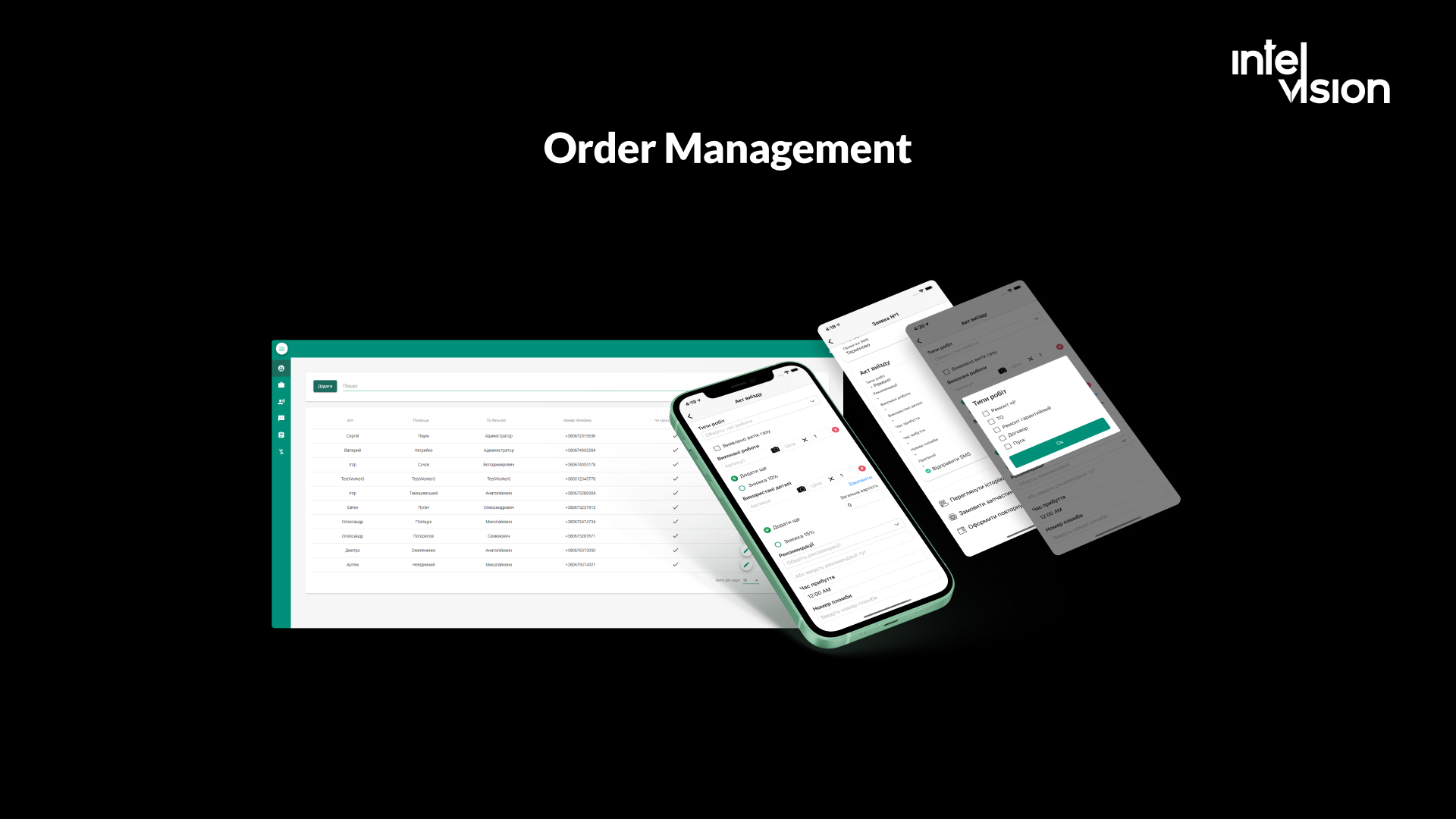
The challenges, as listed on the case page:
- Manual processes and fragmented tools, with no central control.
- No mobile access. Employees could not manage orders on the go or update data from the field in real time.
- No integration with the CRM accounting system, causing data silos, duplicate manual entries and limited reporting.
- No notifications, so employees missed task updates or relied on inefficient channels.
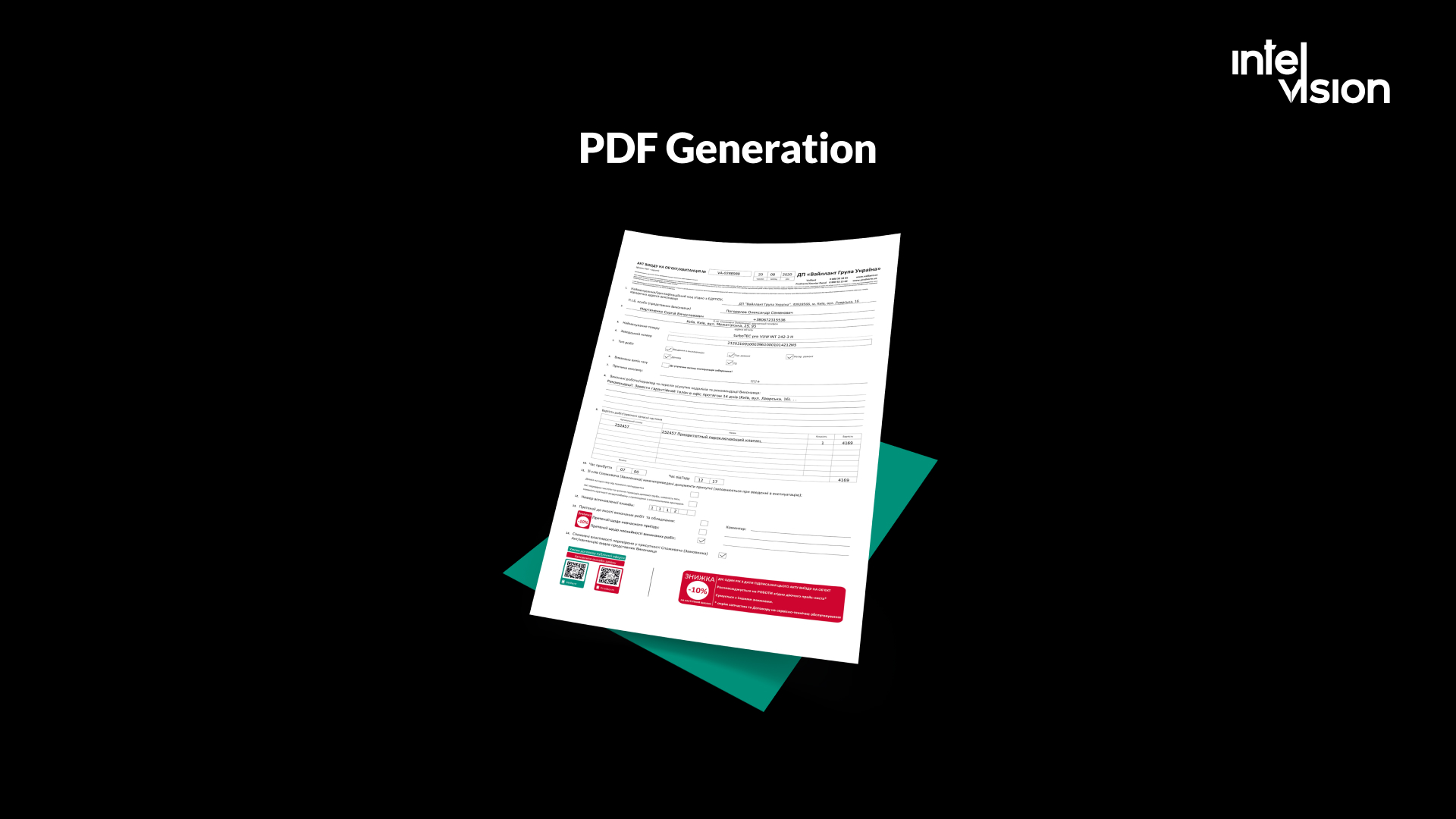
- No unified server infrastructure and no PDF reporting.
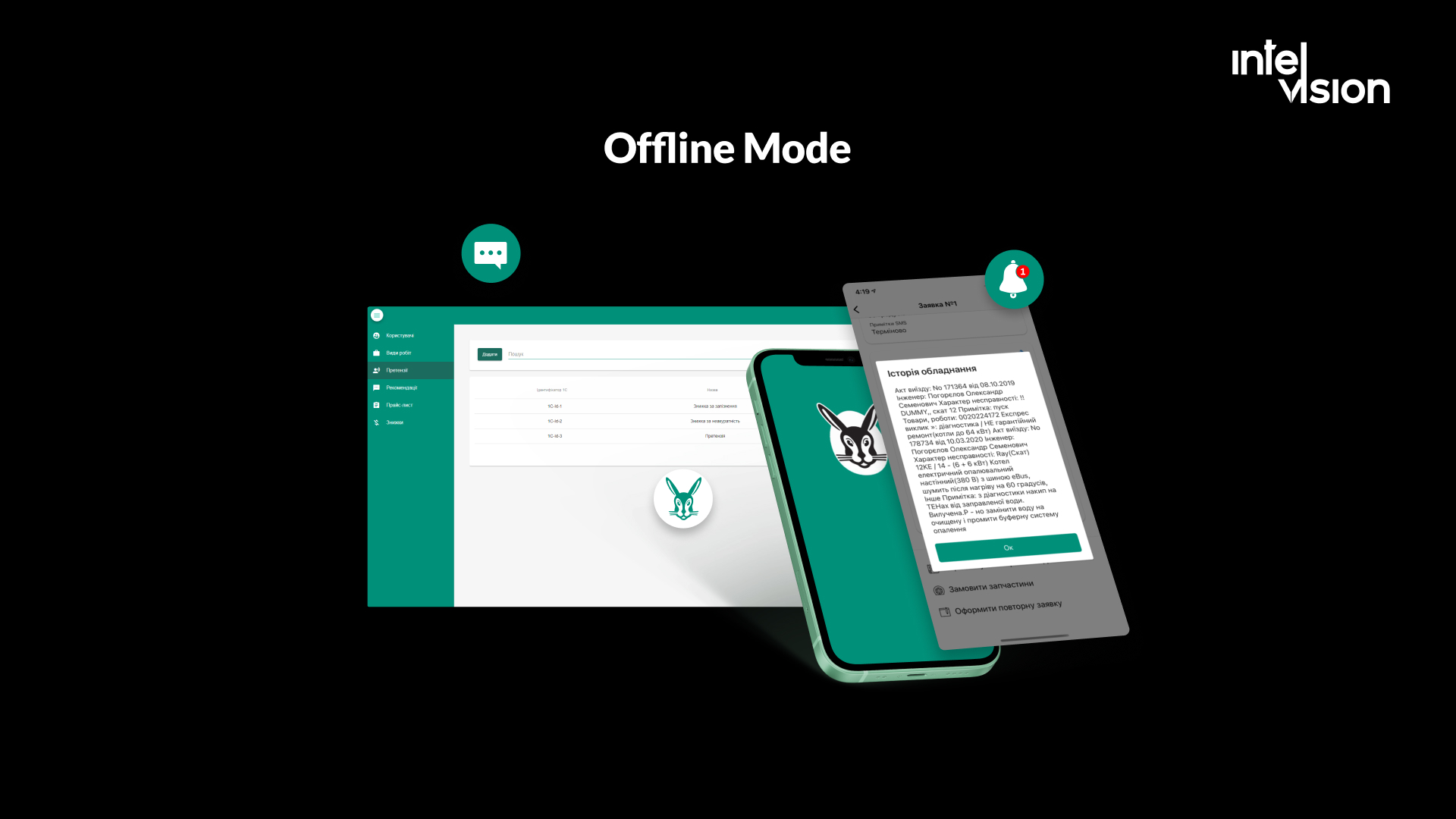
What our team built. A team of one full-stack developer, one mobile developer, one QA engineer and one project manager delivered a mobile-first internal service platform in three months:
- Web and mobile applications. An Angular web interface and a cross-platform Xamarin mobile app, so employees manage orders from any device.
- Offline mode. Technicians can work without an internet connection, and data syncs when the connection returns, so no information is lost and work is not interrupted.
- Push notifications that alert employees in real time about new tasks and orders assigned to them.
- An interactive map with order locations and detailed tooltips; employees click a point to see more about the order.
- Integration with the 1C accounting system for automatic task syncing, financial data flow and accurate reporting.
- PDF reports generated with WkHtmlToPDF.Core, so employees can create, view and send work summaries to clients instantly.
- A QR code scanner for quick access to product information.
- Role-based login so each employee sees what their role allows.
- An admin panel to manage orders, oversee users and generate reports.
Behind it, the system runs on a microservices backend integrated into Vaillant's server infrastructure, with Docker and Azure DevOps CI/CD pipelines for maintainability. The case page lists the budget as EUR 100k+.
The result was a unified order management system that replaced manual workflows: employees receive push notifications, see each order on the map, work offline in the field and send PDF reports without extra effort, while administrators control orders and users from one panel. The client's CEO, Dmytro H., said in the published testimonial that the team "asked in detail about what we actually wanted to accomplish".
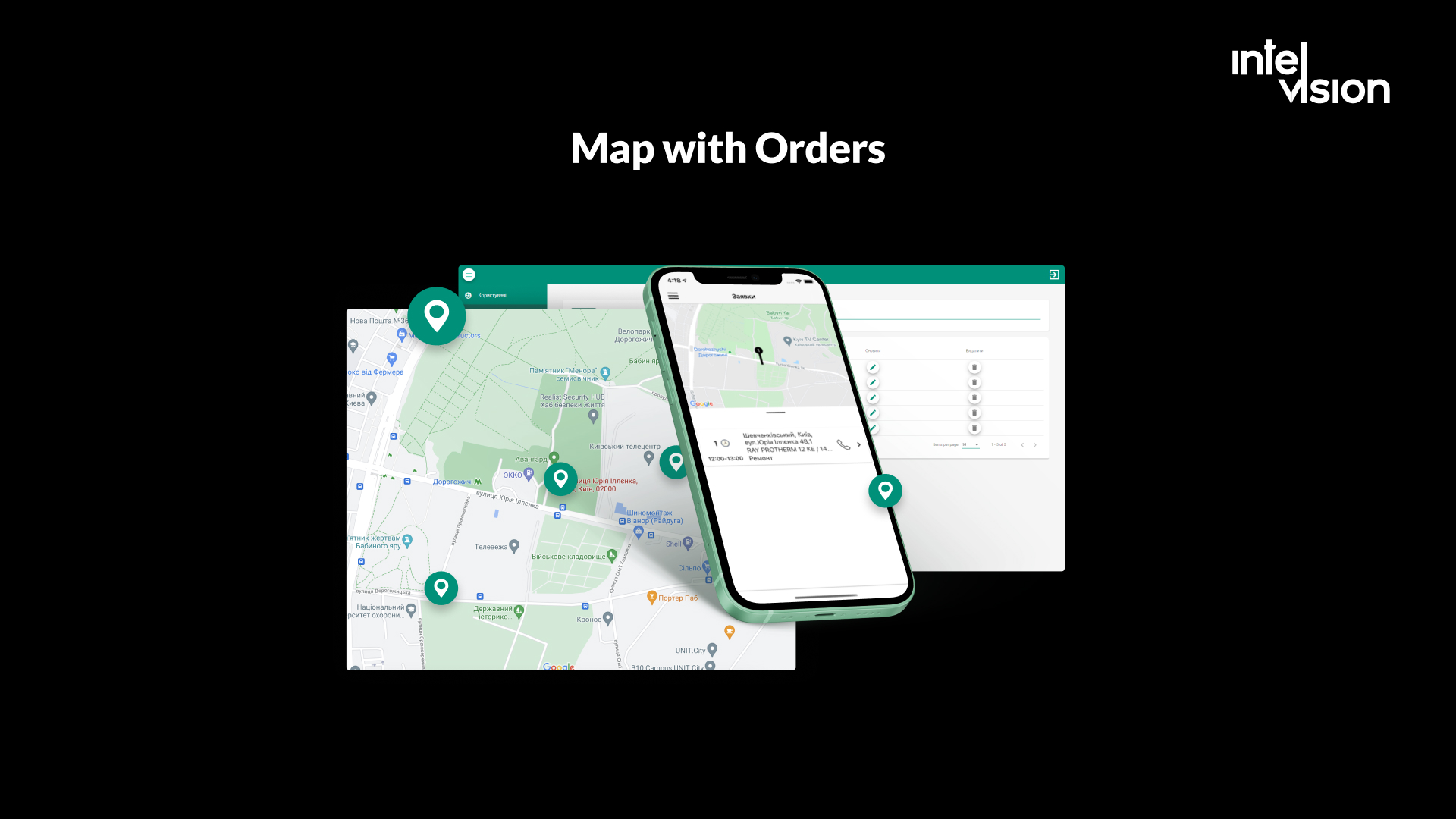
The lesson from this project still holds: the hard part of work management software is rarely the development itself. It is defining the features and the workflow the system must support. An off-the-shelf tool would have covered the task lists; it would not have covered offline field work, the accounting integration and customer-ready reports in one place.
Common mistakes when introducing work management software
- Buying the tool before mapping the work. The software then encodes the confusion.
- Rolling out to everyone at once. Start with one team and one workflow, prove it, then expand.
- Too many fields and statuses. Every extra field reduces the chance a task gets updated.
- Running two systems in parallel. If the old spreadsheet stays "just in case", it becomes the real system.
- Ignoring integrations. Retyping data between the work tool and accounting or CRM recreates the problem you were solving.
- Using the tool for surveillance. Teams that feel watched stop recording the truth, and the data becomes useless.
- Underestimating total cost. Seats, guests, AI credits and add-ons grow faster than the headcount.
- Letting configuration grow without an owner. Assign someone to keep workflows simple and review them regularly.
Conclusion
Work management software is the operating layer for a team's work: one place to identify, plan, schedule, carry out, follow up and analyze everything the team does, not only its projects. In 2026 the leading platforms are mature, increasingly AI-assisted and priced per seat and per AI credit, so the decision is less about features and more about fit, adoption and total cost.
Some teams are best served by a well-configured platform. Others need integrations, offline field work or data control that only a custom system provides. If you are unsure which applies to you, talk to our team. We will tell you honestly whether to buy, configure or build.
Sources
- monday.com: Gartner Magic Quadrant for Collaborative Work Management 2025 (market definition)
- Smartsheet: Named a Leader in the 2026 Gartner Magic Quadrant for Collaborative Work Management
- monday.com named a Leader in the 2026 Gartner Magic Quadrant (press release)
- Wrike named a Leader in the 2026 Gartner Magic Quadrant (press release)
- Atlassian: Gartner Magic Quadrant for Collaborative Work Management
- Asana: Anatomy of Work Index
- Atlassian: How the Atlassian System of Work connects distributed teams (State of Teams 2025)
- UNLEASH: Atlassian State of Teams 2025 findings
- Trello pricing
- Asana pricing
- monday.com pricing
- Wrike pricing
- Smartsheet pricing
- Progress: Podio year in review 2025
- Microsoft Support: Project for the web retirement and transition to Planner
Read Intelvision often? Add us as a preferred source in Google Search.
Add to preferred sources