
9 Remote Team Communication Strategies You Shouldn't Ignore
What's new: New remote work data, a sync vs async guide, a communication charter, time zone practices, AI meeting notes and GDPR, common mistakes, metrics, a case example and an FAQ.
Summarize with AI
Read summarized version with AI
- The remote communication problem has shifted from staying in touch to too much noise: interruptions every two minutes and a quarter of time spent searching for answers.
- Decide per situation whether to write or talk: status and requirements in writing, decisions and difficult conversations live.
- Give each kind of information one home, invite only the people who are needed, and write decisions down.
- Protect three to four hours of time zone overlap and use written end-of-day handovers.
- AI meeting notes help distributed teams catch up, but announce recordings, follow GDPR principles and have a person confirm decisions.
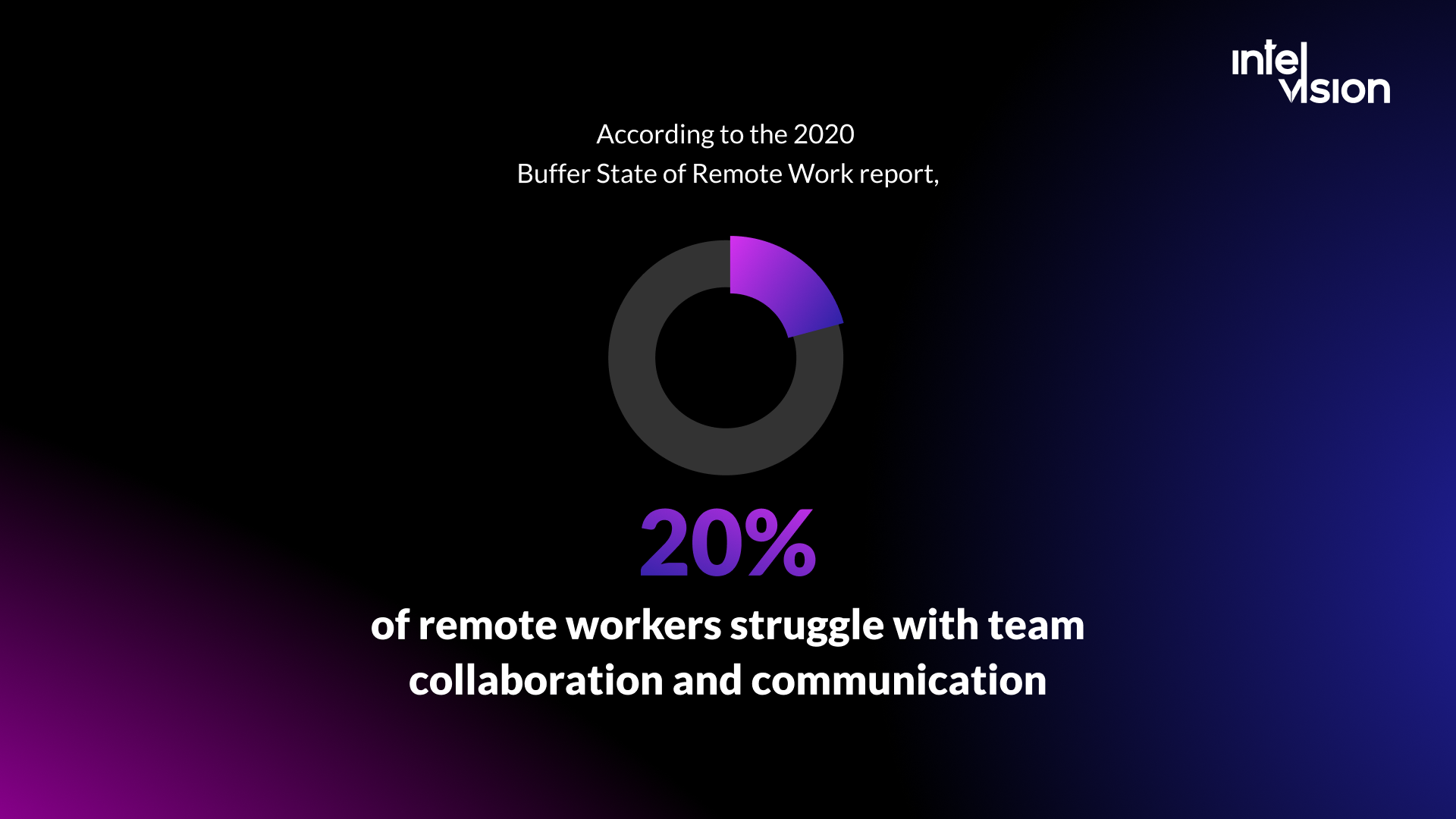
When we first published this article, staying in touch was a common worry for remote teams. That problem has shrunk. In Buffer's 2023 State of Remote Work report, based on 3,000 remote workers, 15% picked collaboration and communication as a struggle, down from 17% the year before, and Buffer notes the figure has fallen every year since 2020. Tools and habits got better.
A different problem took its place: too much communication and too little clarity. A 2025 Microsoft Work Trend Index special report found that employees are interrupted by a meeting, email or chat about every two minutes during core hours, and that the average worker receives 153 Teams messages per weekday. Atlassian's State of Teams 2025, a survey of 12,000 knowledge workers and 200 executives, says teams waste 25% of their time just searching for answers.
So remote team communication in 2026 is less about adding channels and more about designing them. In this article we explain what remote team communication is and why it matters, when to talk live and when to write, the nine strategies we still rely on, how to work across time zones, what AI meeting tools change, and the mistakes and metrics that tell you whether your system works. For the social side of distance, see our guide on how to build a remote team.
What is remote team communication
Remote team communication is every way a distributed company shares information, makes decisions and keeps people connected: chat, video calls, tickets, documents, recorded updates, newsletters, virtual game nights and holiday messages.
Before choosing tools, it helps to understand which kinds of distance your team is dealing with:
- Physical distance: the spatial distance separating team members.
- Time distance: different time zones and working hours, which decide how much of the day people can talk live.
- Operational distance: different departments, skill levels, companies and know-how that get in the way of a shared understanding.
- Affinity distance: missing trust and relationships, which make people hesitate to ask questions or raise problems.
When you know which distances exist across your company, you can choose strategies that fix them. A team in one time zone with low trust needs different help from a team of close colleagues spread across eight hours.
Why is communication important in remote teams
An office supports communication at many levels at once. Team members see each other every day, overhear decisions, use whiteboards to explain ideas and chat at the coffee machine. Large companies even design their offices so that people from different departments and dedicated development teams cross paths as often as possible, because unplanned conversations produce good ideas.
Read also: Remote work vs office: the main pros and cons, and how it works at Intelvision.
A remote team gets none of that by default. People do not bump into each other, there is no place to hang out, and colleagues may live in different time zones. Everything that happened by accident in an office has to happen on purpose online.
When it does not, the cost shows up in delivery. In the 2026 Stack Overflow Developer Survey, unclear priorities or requirements were the most common reason developers gave for their job becoming more difficult, named by 16.6%, ahead of inefficient processes and coordination at 14.6%. In one of our engagements with a German consultancy of around 20 people, daily standups ran with 16 people, most of them irrelevant to any given attendee. Monday meetings consumed entire mornings, and one part-time contributor lost 30% of her limited weekly hours to unstructured meetings. Priorities were re-argued constantly because nothing was written down.
Managers carry most of this load, and they are under strain. Gallup's State of the Global Workplace 2026 report found that global employee engagement fell to 20% in 2025, and manager engagement dropped from 27% to 22% in a single year. A communication system that does not depend on one overloaded manager remembering everything is a real advantage.
Synchronous or asynchronous: choosing the right channel
Remote teams need a different mindset, processes and tools. The most useful decision is when to talk live (synchronous) and when to write (asynchronous). Preferences are split. In Buffer's survey, 36% of remote workers wanted an even mix, 37% wanted mostly or fully asynchronous work and 27% mostly or fully synchronous work. So there is no single right ratio, but there is a right channel for each kind of conversation:
| Situation | Best channel | Why |
|---|---|---|
| Status updates and progress | Written update in the tracker or a channel | Readable at any time, searchable later |
| Requirements and acceptance criteria | The ticket itself | One source of truth for people and AI tools |
| A blocking question | Chat thread, call if not answered within the agreed time | Fast without interrupting everyone |
| A decision with trade-offs | Short call, then a written decision record | Live discussion, permanent result |
| Explaining a bug or a design | Short screen recording | Shows context, no meeting needed |
| Conflict, bad news or personal feedback | Video call, one to one | Tone and trust matter more than speed |
| Team bonding | Live, ideally with cameras on, sometimes in person | Relationships need real-time contact |
The key remote team communication methods to follow in 2026
Remote teams can use many tools and strategies. These are the nine we rely on, updated for how teams work today.
1. A deliberate set of communication tools
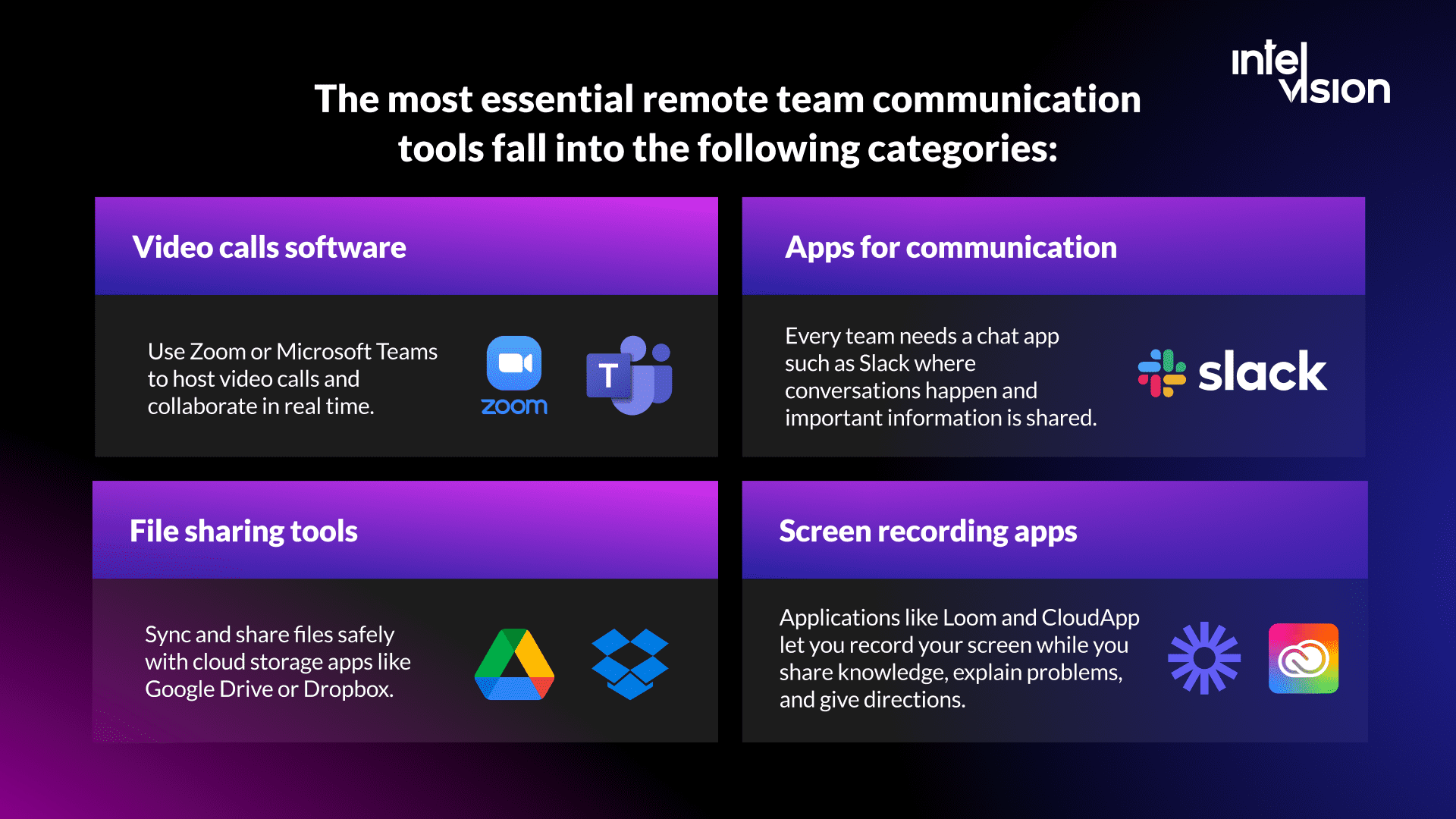
How do you stay in sync across five or more countries and several time zones? Agree on a small set of tools that everyone uses, and on one tool per purpose. The essential categories are:
- Video calls: Zoom, Microsoft Teams or Google Meet for meetings and real-time collaboration.
- Team chat: Slack or Teams, where quick questions and announcements happen.
- Task tracking: Jira, Linear or a similar tracker, where every piece of work and its requirements live.
- Documentation: Confluence, Notion or Google Docs for decisions, how-tos and onboarding.
- File sharing: Google Drive, OneDrive or Dropbox, with access managed by role.
- Screen recording: tools like Loom, now part of Atlassian after an acquisition announced in October 2023, to explain problems and share knowledge without a meeting.
The rule that matters more than the brand: each kind of information has exactly one home. In the consultancy mentioned above, feedback channels were fixed as Jira for tasks, Figma for design and copy, and Teams for daily communication, with requirements written up rather than passed on verbally.
2. Threads
Threads organize conversations by topic inside public channels and let you tag the specific teammates who need to weigh in. They keep a channel readable for someone who joins hours later. Use threads for:
- Status updates.
- Bug reports.
- Project ideas.
- First drafts, mockups, prototypes and specs.
- Troubleshooting and problem-solving.
- Decision-making, ending with a clear "decided" message.
- Weekly snippets.
- Announcements.
You can also have just-for-fun channels that work like small communities, for example #music or #book-club. They do some of the work the office kitchen used to do.
3. Video calls
Video conveys tone and facial expressions that text cannot. In Buffer's survey, 62% of remote workers preferred to be on camera, and 67% of those said it makes communication easier because they can see expressions. People on camera are also less tempted to scroll through other feeds and more likely to engage.
Use video for what it does best: decisions, difficult conversations, planning and relationships. Do not use it to read status updates aloud. Every meeting should have an agenda, an owner and a written outcome.
4. One-to-one conversations
Specialists need a private space to discuss details, ask questions they would not ask in a group, and raise concerns early. Direct messages handle quick questions. Regular one-to-one meetings between a lead and each team member handle the rest: workload, blockers, growth and feedback. Buffer found that 71% of companies with remote workers hold 1:1 meetings. Keep them even when the team is busy; that is when they matter most.
5. Written status updates
Managers can use written updates to follow progress without scheduling extra meetings. Each person lists what they finished, what they are working on and what blocks them, daily or a few times a week, in the tracker or a dedicated channel.
A visible project schedule with tasks, priorities and deadlines lets the project manager, stakeholders and the whole team see the pace: what is done, what comes next and what is at risk. It also stops priorities being re-argued in every meeting. In the consultancy above, priority sessions replaced constant verbal re-prioritization.
6. Recordings and AI meeting notes
Record important meetings, demos and walkthroughs so people who could not attend, or who join the team later, can catch up. Organize recordings by topic and date so they are easy to find.
Transcription no longer needs a separate tool. Google Meet's "Take notes for me" captures notes in a Google Doc with a summary, decisions and action items, and shows every participant that notes are being taken. Zoom offers meeting summaries through its AI assistant. These notes help colleagues in other time zones more than any recording, because nobody watches a one-hour video.
Two rules apply. First, tell people before you record or transcribe, and explain why. In the EU, recordings and transcripts are personal data, so the GDPR principles of purpose limitation, data minimization and storage limitation apply: record for a reason, keep only what you need, and delete it on a schedule. Second, an AI summary is a draft. The meeting owner checks decisions and action items before they go into the tracker.
7. Constant feedback
Remote teams need regular, specific feedback, because people cannot read it from body language in the corridor. Not every form of feedback works, and people react to criticism differently. These techniques help keep feedback balanced and constructive.
Criticize the result, not the person
Feedback should be about a specific outcome, not someone's personal qualities. For instance: "Your ideas are usually original. On the last task, the analysis felt thin. Did you have enough time to look into it properly?" Feedback like this is heard as a chance to change something, not as an attack.
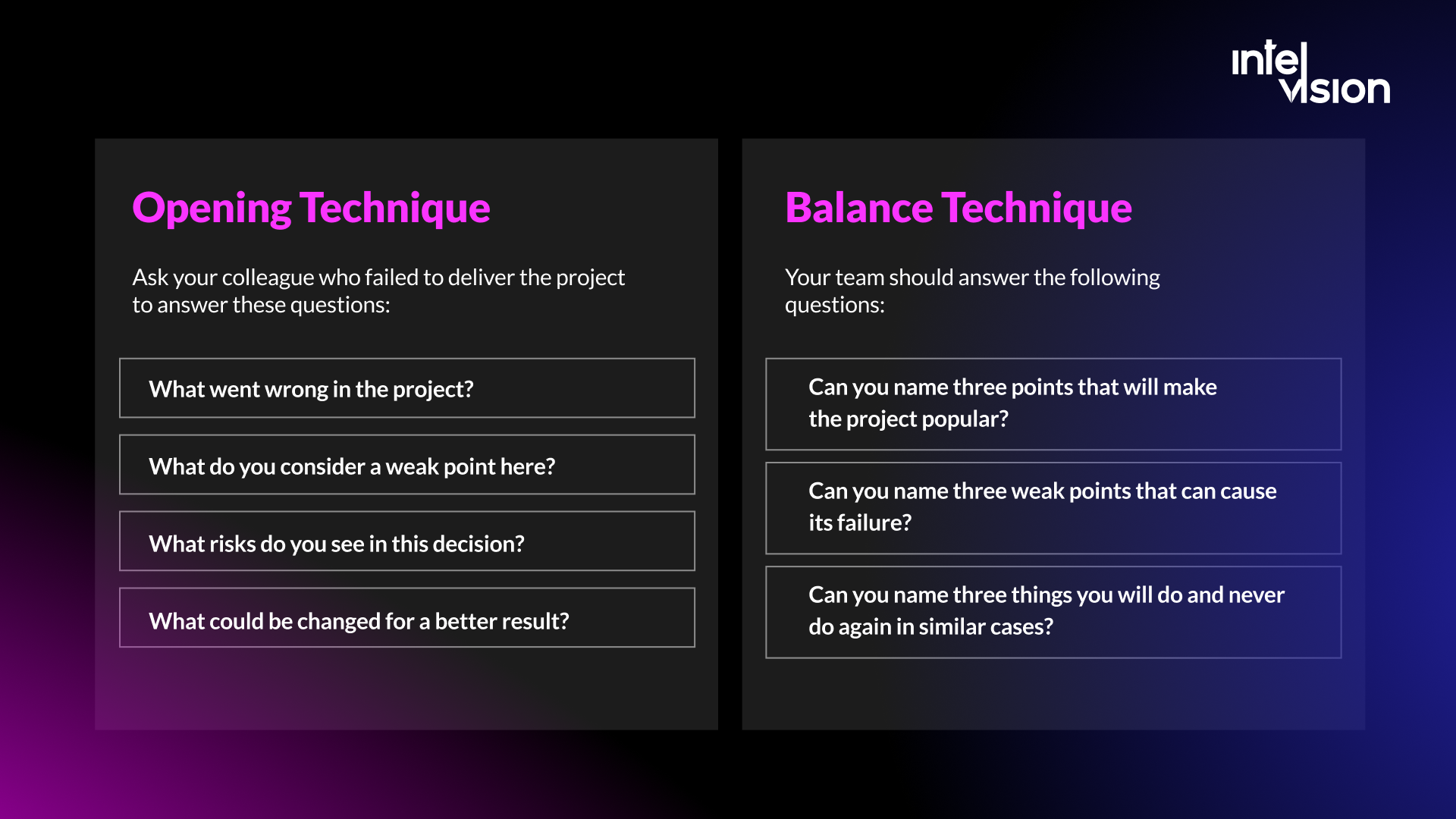
Opening technique
Ask the colleague whose work did not land to answer these questions:
- What went wrong in the project?
- What do you consider the weak point?
- What risks do you see in this decision?
- What could be changed for a better result?
Balance technique
This helps the team evaluate a decision objectively and see both its strong and weak sides. Ask the team:
- Can you name three things that will make this work succeed?
- Can you name three weak points that could cause it to fail?
- Can you name three things you will do again, and three you will never do again, in similar cases?
Run retrospectives on a fixed rhythm and track their action items. In the consultancy above, retrospectives now run every two weeks with tracked actions, so feedback turns into changes rather than complaints.
8. Virtual team-building activities
Loneliness causes disengagement, lower performance and burnout. In Buffer's 2023 report it was the second most common single struggle of remote workers, at 15%, after staying home too often without a reason to leave. Build personal and social bonds on purpose: online games, informal coffee calls, show-and-tell sessions, and an in-person meetup when the budget allows. Our article on remote team-building activities has practical ideas.
9. Celebrate individual and team achievements
In an office, people celebrate birthdays, holidays, releases and wins without planning. Remote teams often forget, because it takes effort. The best remote teams make the effort: a message in the team channel, a short celebration call, a card or a gift sent to someone's home.
Celebrate small and big victories. Just as important, talk through the ups and downs of every finished project together and reflect on what you learned.
Remote team communication tips that improve productivity and profit
To make your remote communication effective, follow these tips:
1. Start each meeting with the state of the project. Say how things are going in one or two sentences, and frame problems so people engage:
"One detail is blocking the work..." When people hear this, they focus. They know they will need to find a solution, and they are ready to brainstorm from the first minute.
"There are two pieces of news, a good one and a bad one..." People are prepared for bad news but know good news is coming too. It creates interest and opens the conversation.
2. Simplify. Jargon and long words do not impress anyone in a remote team, especially when many people work in their second language. Plain words travel better across countries and through translation tools.
3. Keep emails and messages short. Every word should earn its place. "At the moment, we have 40 employees in our team" becomes "40 people work in our team". "During this month" becomes "this month". "As I said" can be removed almost every time. Break longer texts into short paragraphs and put the request or decision in the first line.
4. Show empathy. Let remote colleagues know you are available when they need help, and notice when someone goes quiet.
5. Encourage remote workers to share constructive feedback. Give engineers a safe way to disagree, including with you.
6. Agree on response times. For example: chat within two working hours, email within one working day, urgent issues by phone. Clear expectations remove the pressure to be online all the time.
7. Protect focus time. Block meeting-free hours for everyone. With interruptions every two minutes as the norm, uninterrupted time is the scarcest resource a team has.
8. Invite only the people who are needed. In the consultancy above, standups were cut from 16 people to the product team. Others read the notes.
A remote communication charter you can copy
Most of the strategies above fit on one page. Write it down, agree on it with the team and review it every quarter.
| Topic | Example agreement |
|---|---|
| Core hours | 10:00 to 14:00 CET, when everyone is online for questions and meetings |
| Where work lives | Tasks and requirements in Jira, decisions in Confluence, design feedback in Figma |
| Chat | Questions in team channels, in threads; direct messages only for personal matters |
| Response times | Chat within two working hours, email within one working day |
| Meetings | Agenda in the invite, 30 minutes by default, written outcome within the day |
| Standup | 15 minutes, product team only, async written update on days off |
| Recording and AI notes | Announced at the start, kept for 90 days, decisions copied to the tracker |
| Escalation | Blocked more than half a day: tag the lead; production issue: call the on-call person |
| Availability | Status and calendar kept current, holidays visible to the whole team |
How to run remote meetings people do not resent
Meetings are not the enemy. Bad meetings are. A simple routine before, during and after each meeting removes most of the waste.
Before the meeting:
- Write the purpose in the invite as a question to answer or a decision to make. If you cannot, send a message instead.
- Attach what people should read and share it at least a few hours before, so the call is spent discussing, not presenting.
- Invite the people who decide or contribute. Everyone else gets the notes.
- Default to 25 or 50 minutes, so people have a break before their next call.
During the meeting:
- Start with the state of the project and the question on the table.
- Give remote and quieter participants a turn by name; the loudest voice in the room is not always the best informed.
- Name a note-taker, or announce the AI note-taker, at the start.
- End five minutes early to read back decisions, owners and dates.
After the meeting:
- Post the outcome where the work lives: decisions in the decision log, tasks in the tracker with owners and due dates.
- Tell people who were not there what changed for them.
- Cancel recurring meetings that no longer produce decisions. Review the team's recurring meetings every quarter.
Communicating with external engineers and partners
Many remote teams today include engineers from a partner company: a staff augmentation specialist, a dedicated team or a contractor. The same rules apply, with three additions.
- Put them in your channels, not a separate one. External engineers who join your standups, chat, tracker and repositories become part of the team. Engineers who only hear from an account manager stay outsiders and build the wrong thing.
- Give them direct access to decision-makers. Every message relayed through an intermediary loses detail and adds a day.
- Agree on escalation on both sides. Who on your side sets priorities, who on the partner side answers for delivery, and how either side raises a problem before it becomes a crisis.
This is how our own engineers work with clients: inside the client's tools and routines, with direct access to the people making product decisions.
Communicating across time zones
Microsoft's data shows that nearly a third of meetings now span multiple time zones, and in Buffer's survey 62% of remote workers worked with teammates spread across several of them. A few practices make the difference:
- Protect the overlap. Plan for three to four shared hours a day and keep standups, reviews and decisions inside them.
- Write end-of-day handovers. What I finished, what is in progress, what I need from you, and where the details are.
- Rotate inconvenient slots. If someone must join early or late, it should not always be the same people.
- Make blockers visible early. A question asked at 16:00 in one location may not be answered until the next morning, so ask it at 10:00.
- Use calendars that show local time for everyone invited, and write dates and times with a time zone.
Teams that work with Central and Eastern European engineers from Germany, Austria or Switzerland have an easy version of this problem: the gap is one hour at most. For the wider case for distributed teams, read the four main advantages of distributed development teams.
How AI changes remote team communication
AI is now part of how remote teams talk. Meeting assistants write notes, chat tools summarize long threads, and search assistants answer "where is this documented?" in seconds. Used well, this cuts the time lost to searching for answers and helps people in other time zones catch up.
Four cautions keep it useful:
- AI amplifies what is already there. Google's 2025 DORA report found that AI does not fix a team; it amplifies what is already there. Strong teams get better, and struggling teams see their problems intensify. If decisions are never written down, an assistant has nothing reliable to find.
- Context decides quality. In the 2026 Stack Overflow survey, developers rated project goals and requirements (85%) and code and documentation (73%) as the best sources of trusted context for AI, and 93% said source attribution is needed to trust AI output.
- Summaries can be wrong. Treat them like a colleague's draft. The meeting owner confirms decisions and owners.
- Data goes where the tool goes. Agree which tools are approved, which meetings may be recorded, and what customer or personal data must stay out of prompts.
The same applies to engineering. Clear tickets and written acceptance criteria help remote engineers and AI coding assistants alike to build the right thing.
Common remote communication mistakes
- Treating every question as a meeting. It fills calendars and empties focus time.
- Inviting everyone to everything. Large standups waste the time of most attendees.
- Verbal-only decisions. If it is not written down, it will be re-argued next week.
- Several homes for the same information. Requirements split across chat, email and documents create conflicting versions.
- Expecting instant replies. It creates anxiety and constant context switching.
- Monitoring instead of trusting. Activity trackers measure presence, not results, and damage trust.
- Ignoring the quiet people. Silence in a remote team often means confusion or overload, not agreement.
- Dropping the social side. Teams without any informal contact stop asking each other for help.
How to tell if your remote communication works
You can measure communication through its effects on delivery. Track a few signals every month:
- Time to unblock: how long a blocking question waits for an answer.
- Meeting load: meeting hours per person per week, and how many meetings end with a written outcome.
- Ticket quality: share of tickets with clear acceptance criteria when work starts.
- Rework from misunderstanding: work reopened because requirements were unclear.
- Predictability: how much of what was planned for a sprint was delivered.
- Team sentiment: a short pulse survey on clarity, workload and whether people feel heard.
If these numbers are bad and nobody can say why, the problem is usually the operating model rather than the tools. That is what our engineering diagnostic looks for, and what an engineering operating system fixes: ownership, cadence, quality gates and one line of sight from priorities to releases.
How we keep remote communication working
Your teams can stay close even when they are apart. We have not solved every communication challenge at Intelvision, but our engineers work inside our clients' own tools, standups and release processes, and we hold that work to a system that:
- Connects every team member directly to the people and information they need to do their jobs, with no account layer in between.
- Keeps one source of truth for tasks, decisions and requirements, so important information is not lost.
- Lets everyone focus on work that creates real impact for our clients.
In the consultancy described in this article, that meant a dedicated project manager who took over coordination from the founder, standups cut to the product team, Jira as the single source of truth, retrospectives every two weeks, and a handover framework tested during a real team absence.
Whether you run a fully distributed team, extend your team with external engineers, or simply have people who often work from home, we hope this article has given you practical ideas to make remote communication work. If you need engineers who already work this way, see our staff augmentation services or talk to us.
Sources
- Buffer: State of Remote Work 2023
- Microsoft Work Trend Index: Breaking down the infinite workday (2025)
- Atlassian: State of Teams 2025
- Gallup: State of the Global Workplace
- Atlassian: Atlassian acquires Loom (October 2023)
- Google Meet Help: Take notes for me
- Zoom: AI assistant
- GDPR Article 5: Principles relating to processing of personal data
- Google Cloud: Announcing the 2025 DORA report
- Stack Overflow Developer Survey 2026: Work
- Stack Overflow Blog: The results of the 2026 Developer Survey are here
Read Intelvision often? Add us as a preferred source in Google Search.
Add to preferred sources