CRM in Construction: The Comprehensive Guide to Successful Client Relationships
What's new: New market context, published CRM prices, a CRM vs PM vs ERP comparison, eight key features, an implementation plan, common mistakes, AI in CRM, GDPR and Data Act notes, case examples and an FAQ.
Summarize with AI
Read summarized version with AI
- A construction CRM tracks clients, partners, bids and follow-ups across many companies and projects, and works best when connected to estimating, project management and ERP.
- Key features: a pipeline that matches preconstruction, contact and company history, document management for prequalification, forecasting, mobile and offline access, permissions and GDPR support.
- Published prices range from free tiers to $65 to $195 per user per month for mid-tier editions, with premium tiers higher, but configuration, data migration, integrations and training are often the larger cost.
- Start from money: define what the CRM must save or earn, map the process, then compare vendors against it and pilot with one team.
- AI features help with summaries, drafts and data entry, but only on clean data; custom or integrated CRMs make sense when field work, portals or system integration are the real need.
Construction runs on relationships. Developers come back to contractors they trust, general contractors invite the subcontractors they know, and suppliers win repeat orders from site managers who remember them. Winning more work from clients you already serve is usually cheaper than winning new ones, but only if you remember who they are, what you promised and when to follow up.
That is harder than it sounds when pipelines swing. Deloitte's 2026 engineering and construction outlook reports that in the US, project abandonments rose 88.2% year over year in August 2025, while planning activity for commercial and institutional work rose 30%. Projects disappear and new ones appear at the same time. A construction company that tracks its bids, contacts and follow-ups in Outlook and Excel cannot see either clearly.
Customer relationship management (CRM) software fixes that. This guide explains what CRM in construction is, the problems it solves, the features that matter, the types of construction CRM available in 2026 and what they cost, how to choose and implement one, the common mistakes, what AI changes, and when a custom or integrated CRM makes more sense than an off-the-shelf product.
What is CRM in construction
What does CRM mean in construction? CRM is an approach to managing relationships between a company and its leads, partners and clients, and the software that supports it. Its core purpose is to help you track and manage those relationships. It also makes the business more efficient, because a CRM automates routine follow-ups, gives the team shared records and produces reports on what is working.
In construction, CRM is not limited to customers. Companies deal with a wide range of stakeholders: owners and developers, architects and engineers, general contractors, subcontractors, suppliers, public authorities and lenders. One project can involve dozens of companies, and the same people reappear on the next project in different roles. A CRM keeps all those relationships, and the bids and projects that connect them, in one place. With mobile access, site managers and estimators can see and update that information in real time.
Different construction businesses use CRM differently:
- General contractors track owners, developers and architects, prequalification, bids and the path from tender to contract.
- Subcontractors and specialty trades track invitations to bid from many general contractors, bid deadlines and win rates per client.
- Residential builders and remodelers manage homeowner leads, site visits, proposals and change orders.
- Developers and property companies manage investors, buyers, tenants and partners over long cycles.
- Suppliers and manufacturers manage dealer and contractor networks, orders and service requests.
A CRM is also different from the other systems a construction company runs:
| System | Main question it answers | Typical data |
|---|---|---|
| CRM | Who are our clients and partners, and what work can we win? | Contacts, companies, leads, bids, follow-ups, proposals |
| Project management | How is the work we won being delivered? | Schedules, RFIs, submittals, daily logs, documents |
| ERP and accounting | What does it cost and what do we earn? | Job costs, invoices, payroll, purchasing |
| Estimating | What will this project cost to build? | Quantities, unit prices, labor, subcontractor quotes |
The value appears when these systems share data: a won bid in the CRM becomes a project in project management and a job in the ERP without anyone retyping it. Our guide to ERP for the construction industry covers the financial side.
What issues a CRM implementation can help with
Many construction companies still track relationships in Outlook and Excel, so employees work from several disconnected documents. None of them gives an accurate, current picture of the company's relationships.
Without a clear record of previous conversations, employees repeat questions or make contradictory promises, which damages the company's reputation with clients and partners. A construction-focused CRM prevents this by making accurate, current and actionable relationship data easy to find.
The most common problems a CRM solves:
- Missed follow-ups. Bids are submitted and nobody calls back before the decision. A CRM reminds the owner of every open bid.
- Relationships that leave with people. When an estimator or project manager quits, their contacts and history leave with them unless they are in a shared system.
- No view of the pipeline. Management cannot see how much work is likely to be won next quarter, so hiring and purchasing are guesses.
- Scattered prequalification documents. Insurance certificates, safety records and references live in different folders and expire unnoticed.
- Unknown win rates. Without data, you cannot tell which clients, project types or regions are worth bidding for.
- Weak retention. Past clients hear from you only when you need work. A CRM helps you keep in touch and win repeat business.
With a CRM, you can follow each client's history, act at the right moment and work on retention as deliberately as on new business.
Key benefits of a CRM system for construction companies
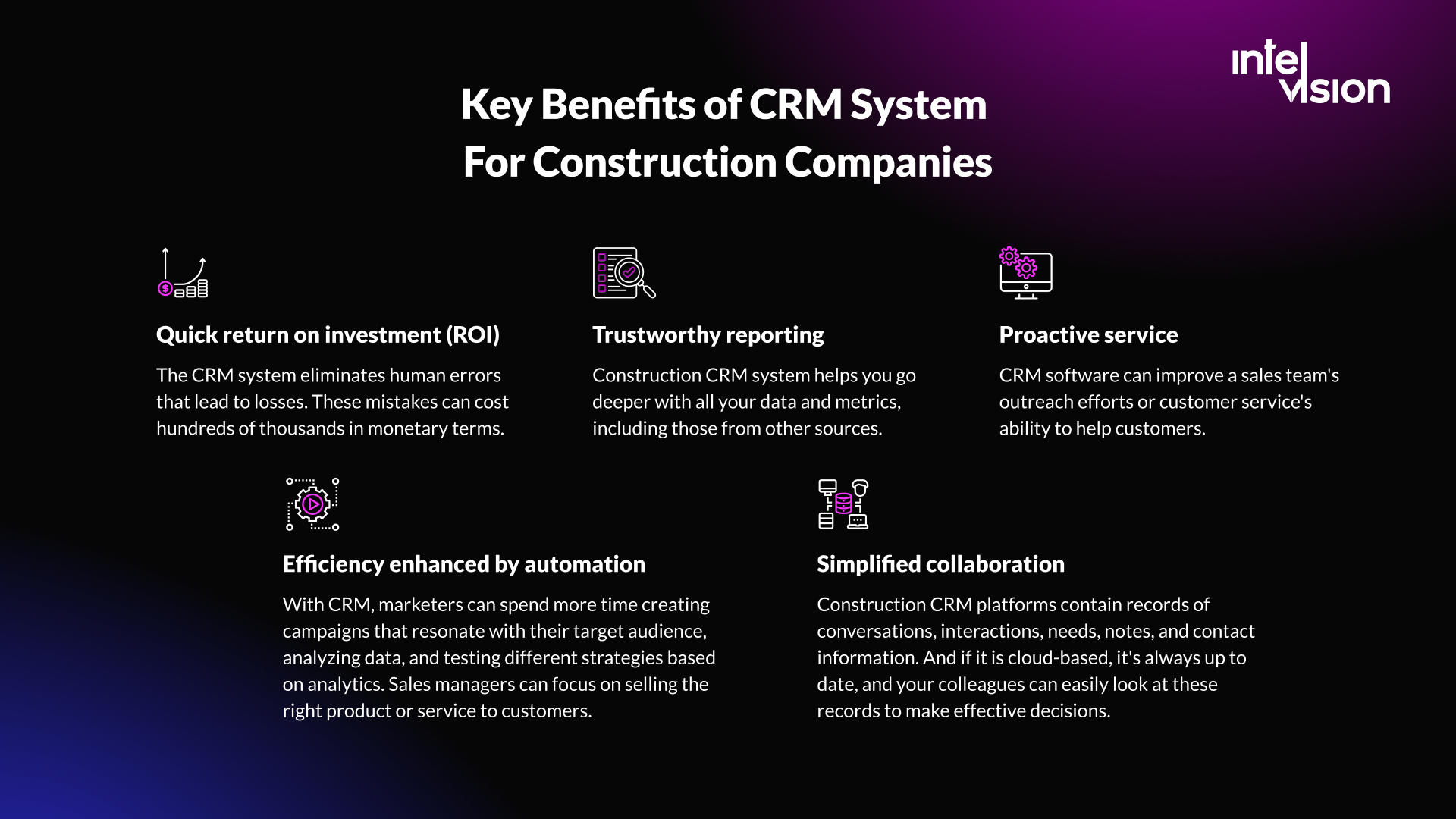
For teams that already work with a CRM, it is hard to imagine going back. The main benefits are:
- Fewer costly mistakes. A CRM removes many human errors that lose work: a forgotten deadline, an outdated price, a promise nobody wrote down. In construction, one lost contract can be worth more than years of software fees.
- Trustworthy reporting. A construction CRM lets you analyze your pipeline, win rates and client history, including data from other systems.
- Proactive service. Sales and account teams can reach out at the right time, and service teams can answer clients with the full history in front of them.
- Efficiency through automation. Reminders, data entry and routine emails run automatically, so estimators and business developers spend more time with clients and less on admin.
- Simpler collaboration. A CRM holds conversations, notes, needs and contact details in one place. In a cloud system, colleagues always see the current record and can make decisions from it.
Together, these improve how efficiently the whole company wins and keeps work. To see whether they do, measure a few numbers before and after implementation: bid win rate, time from inquiry to first response, share of revenue from repeat clients, and how many open bids have a scheduled next step.
The most important CRM features for construction companies
To handle the specific challenges of construction, look for these features. The first four were the core of this guide when we first published it; the rest have become just as important.
Activity and document management
You do not control whether a client signs, but you control the work that makes it more likely: calls, emails, site visits and proposals. A CRM tracks those activities and reminds owners of the next step. It should also store the documents that go with a relationship, such as prequalification forms, insurance certificates, safety records and references, with expiry dates, so you stay compliant with client and regulatory requirements.
Contact and company management
All contacts and companies should live in one database that is easy to search, with company details, roles and the history of every interaction. Construction needs one more thing: relationships between companies and people across projects. The architect you worked with last year may be at a different firm today, and the developer's project manager may be your next client's owner representative.
Data analytics
The right analytics show what it takes to win work and what stops you: win rates by client, sector, region and project size, the average time from invitation to decision, and the reasons for lost bids.
Forecasting
A CRM helps you forecast which bids are likely to close, when, and for how much. Combined with your current backlog, that shows managers where to focus and where capacity will be short, before it becomes a last-minute problem.
A pipeline that matches preconstruction
Generic sales stages do not fit construction. Configure stages that match how you win work: lead, invitation to bid, bid/no-bid decision, estimating, submitted, shortlisted, negotiation, won or lost. Each stage should have a clear owner and next action.
Integrations with estimating, project management and accounting
A CRM that does not exchange data with the rest of your systems becomes one more place to retype information. At minimum, connect email and calendar. Then connect estimating, so bid values flow in, and project management and ERP, so a won bid becomes a project and a job without manual entry.
Mobile and offline access
Estimators, site managers and business developers are often away from a desk. They need to log calls, take notes by voice, look up projects and contacts, and receive reminders on their phones. On sites with weak signal, offline access with synchronization when the connection returns makes the difference between data that gets entered and data that does not.
Permissions and data protection
A CRM holds personal data, so in the EU the GDPR principles apply: purpose limitation, data minimization, accuracy and storage limitation. Choose a system with role-based permissions, audit logs, data export and the ability to delete records on request.
Types of construction CRM software in 2026
There are three broad options, and many companies combine them.
General-purpose CRMs such as Salesforce, Microsoft Dynamics 365 Sales, HubSpot or Zoho are flexible and well supported, with large ecosystems of integrations. They need configuration to fit construction, and their price grows quickly with users and add-ons.
Construction-specific CRMs come with bid tracking, construction pipelines and project fields out of the box. Followup CRM, for example, describes itself as a sales and bid-tracking CRM for contractors. JobTread lists a construction CRM and lead management among the features of its construction management software.
Custom or integrated CRMs are built around your own processes, or connect a standard CRM tightly with your estimating, ERP and field tools. They cost more upfront and make sense when your processes are a competitive advantage or when off-the-shelf products force double entry.
Published list prices, as shown on vendor pricing pages in October 2026, in US dollars and excluding taxes:
| Product | Type | Published price |
|---|---|---|
| Salesforce Sales Cloud | General-purpose | Starter Suite $25 and Pro Suite $100 per user per month; Core edition $195 per user per month, billed annually |
| Microsoft Dynamics 365 Sales | General-purpose | Professional $65, Enterprise $105, Premium $150 per user per month, billed annually |
| HubSpot Sales Hub | General-purpose | Free for up to 2 users; Professional from $90 per seat per month with an annual commitment, plus a required one-time $1,500 onboarding fee; Enterprise from $150 per seat plus $3,500 onboarding |
| Followup CRM | Construction-specific | Starter $99 and Professional $149 per user per month billed annually, 5-user minimum, one-year commitment, one-time launch fee of $2,500 or $5,000 |
| JobTread | Construction management with CRM | $199 per month base including one internal user, plus $20 per month for each additional user up to ten (lower rates above that); 20% less on an annual plan |
Prices change often and differ by currency and region, so treat these as a starting point and request a quote.
How much a construction CRM costs
License fees are the visible part of the cost. For a team of ten users in the first year, list prices alone come to roughly:
- HubSpot Sales Hub Professional: 10 × $90 × 12 = $10,800, plus $1,500 onboarding, about $12,300.
- Dynamics 365 Sales Enterprise: 10 × $105 × 12 = $12,600.
- Followup CRM Professional: 10 × $149 × 12 = $17,880, plus a $5,000 launch fee, about $22,880.
The rest of the cost is less visible but often larger:
- Configuration: pipelines, fields, permissions, automations and reports that match your process.
- Data migration: cleaning and importing contacts, companies and history from Excel, Outlook and old systems.
- Integrations: connecting estimating, accounting, ERP and project management.
- Training and adoption: the hours your people spend learning the system, and a champion who keeps the data clean.
- Add-ons: AI features, extra storage or advanced reporting are often priced separately.
Before you compare vendors, write down what the CRM must save or earn. If it helps you win one more mid-sized contract a year, most of these costs pay back quickly. If nobody can name the gain, the project is not ready.
How to choose the best construction CRM software
How do you choose a CRM for a commercial construction company, or the right construction software development partner to build or integrate one? Start with three steps:
- Determine why you need a CRM. The answer must include money. For example: "We lose N bids a month because nobody follows up. That is worth €X. With a CRM, we expect to recover part of that."
- Determine the fundamental changes the CRM should bring. For example: "Every open bid has an owner and a next step. If this does not happen, we keep losing work we could have won."
- Turn the first two steps into a flowchart of your business processes and send it to the CRM vendors or development partners you are considering. Ask each one which parts work out of the box, which need configuration and which must be built.
What else to consider?
Review customer references of the CRM provider
Ask for references from companies of your size and type, and talk to them. Check how transparent and reliable the provider is, and what technical and commercial support it gives after the contract is signed.
Check construction-specific integrations
Integrations with email, calendar, accounting, estimating, ERP and project management are among the most important factors in choosing a CRM. Without them, your team updates records in several places, and key data ends up wrong or missing. Ask vendors for a demo with your own systems, not a generic one, and ask who maintains each integration when one side changes.
Choose between cloud and on-premises
Most CRMs are now cloud-hosted. That is the easiest option: no servers to buy, and the vendor handles updates, backups and availability.
If you want full control over your data, you can still run a CRM on your own infrastructure. That means higher upfront costs and ongoing maintenance, but no dependence on an external provider. For EU companies, ask cloud vendors where data is stored and processed. Since 12 September 2025, the EU Data Act has applied, with rules that let customers switch between data processing services, including cloud providers. Check how you would export your data and move if you ever need to.
Insist on good mobile functionality
Even if you think you will rarely use it, mobile access matters in construction. It lets your team capture lead information on site and on the road, before it is forgotten. The CRM app should let users log calls automatically, enter notes by voice, search and filter contacts, companies and projects, receive push notifications, and review upcoming and overdue follow-ups.
Check data ownership and exit terms
Make sure you can export all your data, including history and attachments, in a usable format, and that the contract states what happens to it if you leave.
How to implement a CRM in your construction company
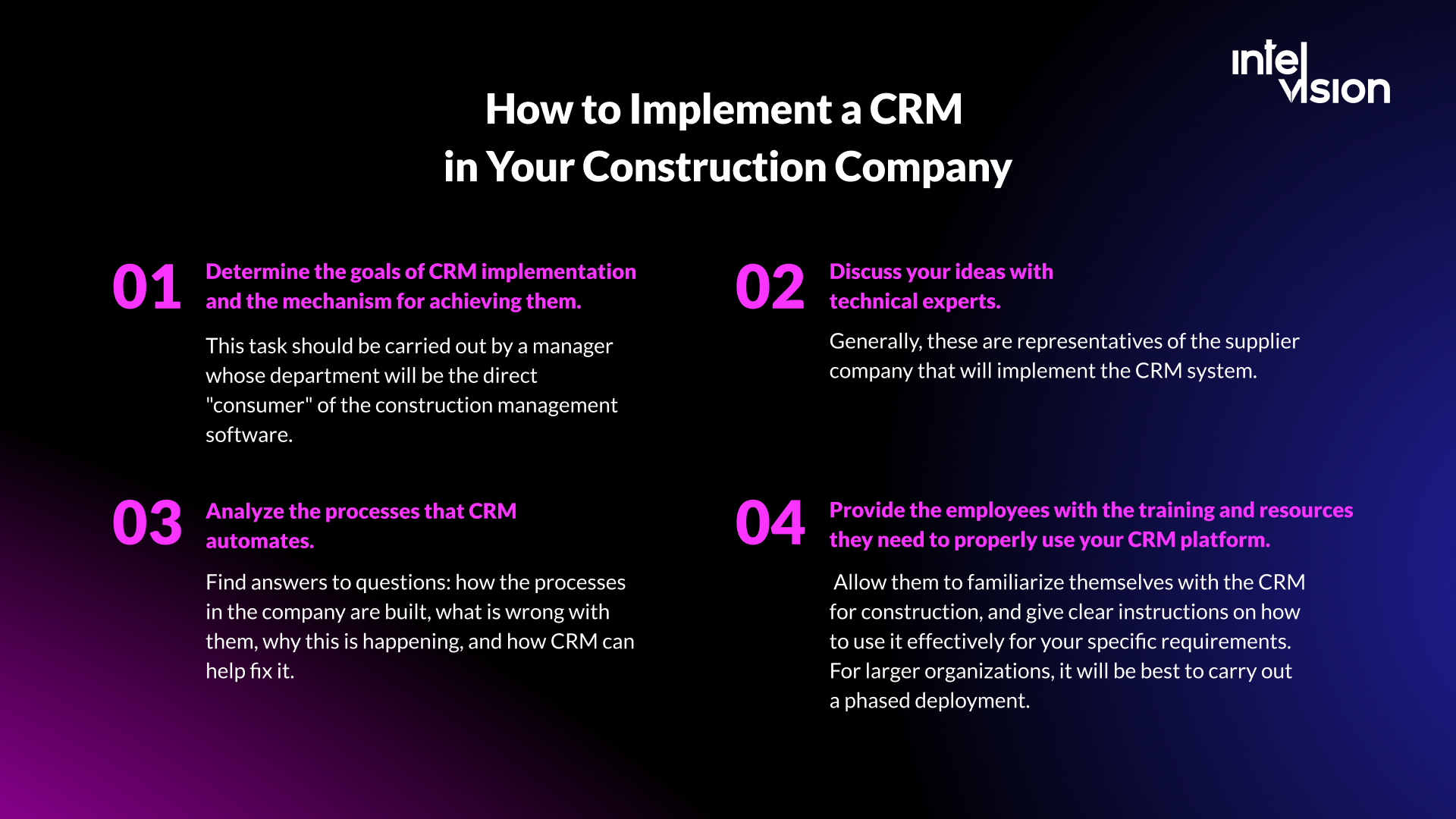
Where do you start, and how do you split CRM implementation into stages? A phased plan for a mid-sized company:
| Phase | Typical duration | What happens |
|---|---|---|
| 1. Goals and processes | 1 to 2 weeks | Agree goals and metrics; map how leads and bids move today and what goes wrong |
| 2. Configuration | 2 to 4 weeks | Pipeline stages, fields, permissions, automations, reports |
| 3. Data migration | 1 to 3 weeks, in parallel | Clean, deduplicate and import contacts, companies and open bids |
| 4. Pilot | 3 to 4 weeks | One team or region uses the CRM for real work; fix what gets in the way |
| 5. Rollout and training | 2 to 6 weeks | Phased rollout to other teams, short role-based training |
| 6. Review | After 90 days | Compare metrics with the baseline, adjust, plan integrations |
Along the way, follow these principles:
- Set the goals of the CRM implementation and how to reach them. The manager of the department that will use the CRM most should own this.
- Analyze the processes the CRM will automate. How are they built today, what is wrong with them, why, and how can the CRM help?
- Discuss your plans with technical experts, usually the vendor's or partner's implementation team, before you configure anything.
- Give employees the training and resources they need. Let them try the system, and give clear instructions for your specific processes. For larger organizations, a phased rollout works best.
Once the team is ready, get off to a good start by:
- Customizing the setup to match your process.
- Setting up automations (emails, data entry, reminders) so no important task is missed.
- Setting up reports for your key metrics.
- Setting up forecasting to improve planning.
- Importing existing data and adding new contacts.
With the CRM set up properly, you are ready to track bids, manage clients and projects, and use the numbers to improve.
Common CRM mistakes construction companies make
- Buying before defining the process. A CRM automates your process; if nobody agrees what the process is, it automates confusion.
- Copying a generic sales pipeline. Stages built for software sales do not fit bids, tenders and prequalification.
- Importing dirty data. Duplicates and outdated contacts destroy trust in the system in the first week.
- Too many fields. Every mandatory field is a reason for a busy estimator not to use the system.
- No integrations. If people must retype data from estimating or email, they stop updating the CRM.
- Ignoring the field. A CRM that only works at a desk misses the information gathered on site.
- No owner. Without a named person responsible for data quality and adoption, usage fades within months. Our guide on overcoming tech adoption barriers in construction covers how to avoid this.
AI in construction CRM: what is real in 2026
AI is now built into most major CRMs. Microsoft includes Copilot and access to prebuilt agents in Dynamics 365 Sales Enterprise, though running agents needs Copilot Credits, which are bought separately below the Premium edition. Salesforce includes Agentforce for Sales in its top Max edition and sells it as an add-on from $125 per user per month. Salesforce's own State of Sales research says nine in ten sales teams use agents or expect to within two years; treat a vendor's survey about its own category with some caution.
Useful applications for construction companies today:
- Summaries of long email threads, calls and meetings with a client before the next conversation.
- Drafts of follow-up emails, proposals and prequalification answers from your own past documents.
- Data entry from emails and calendars, so contacts and activities are logged without typing.
- Bid/no-bid support that compares a new invitation with your history of similar projects, clients and win rates.
- Reminders when an important relationship has gone quiet.
Two cautions. First, AI is only as good as the data behind it. Deloitte's outlook warns that poor-quality data frequently undermines the reliability of analytics and AI tools in engineering and construction, so clean data comes first. Second, AI features process personal data. Under GDPR, decide what the AI may access, keep only what you need, and be transparent with the people whose data you hold.
Grow with a CRM, not Excel: when custom CRM development makes sense
For most construction companies, the right start is an established CRM, configured well. Custom development makes sense in three situations:
- Your process is your advantage. If the way you manage clients, bids or service is what sets you apart, a generic tool will flatten it.
- The CRM must work where your people work. Field teams need offline mobile apps, dealer networks need their own portals, and service teams need orders, staff and finances in one place.
- Your systems do not talk to each other. Sometimes the best "CRM project" is an integration layer that connects the CRM you have with estimating, ERP and field tools.
At Intelvision we do not sell a CRM product. We build custom software for construction and related industries and connect it with the systems our clients already run. Examples from our published case studies:
- For Vaillant, a team of four built a web and mobile service platform in three months that automates order management for field teams, with full CRM integration, offline access, push alerts and real-time PDF reporting.
- For an automotive parts manufacturer in the DACH region that managed dealers with scattered Excel-based tools, we built one dealer portal that cut order and warranty processing time by 40%, with 92% dealer adoption within two quarters.
- For Posude, we built an offline-first mobile ordering app for B2B sales reps, synchronized with the CRM, as an MVP in three months.
Whether you buy, integrate or build, we focus on systems people actually use: simple to learn, connected to the tools around them and owned by you. If you are weighing a CRM against your other software, our features and integrations work and our article on the benefits of CRM for your business are good next steps.
Final thoughts
An effective CRM brings all the information about clients, partners and bids together and helps you act on it quickly. That increases the share of work you win and keep, which directly affects a construction company's income. Some examples of how a CRM helps with everyday tasks:
- Following the whole history of a client or project. All information is grouped in one place, and only authorized employees can see it. From a phone or a computer, you can view reports, plans, progress and documents.
- Giving instructions to the team. You do not need extra planning meetings, especially when people work at different sites. Assign follow-ups and tasks online, with deadlines and owners.
- Keeping access to contacts when people leave. A client used to deal with one manager, and that manager quits or is unavailable. Without a CRM, communication breaks. With one, all information about the client and the history of conversations stays in the system.
These are just a few examples. Chosen and implemented well, a CRM gives you control over your pipeline and your relationships, and the data to improve both.
Sources
- Deloitte: 2026 Engineering and Construction Industry Outlook
- Salesforce: Sales Cloud pricing
- Microsoft: Dynamics 365 Sales pricing
- HubSpot: Sales Hub pricing
- Followup CRM: Pricing
- JobTread: Pricing
- Salesforce: State of Sales report
- GDPR Article 5: Principles relating to processing of personal data
- European Commission: Data Act
Read Intelvision often? Add us as a preferred source in Google Search.
Add to preferred sources