ERP for Finance: Key Features and Benefits
What's new: E-invoicing and SAP maintenance deadlines, instant payments, new feature and comparison tables, a selection process, implementation pitfalls, AI in finance and revisited 2022 predictions.
Summarize with AI
Read summarized version with AI
- An ERP for finance connects the general ledger to sales, purchasing, inventory, projects and HR, so financial data is produced by daily work instead of re-keyed at month end.
- 2026 adds pressure: German e-invoice issuing becomes mandatory from 2027 and 2028, EU digital reporting for cross-border B2B starts in 2030, and SAP Business Suite 7 mainstream maintenance ends in 2027.
- Core features to check: multi-entity ledger, AP and AR with e-invoicing, cash management, fixed assets, close and consolidation, planning, analytics, audit trail and good APIs.
- Keep the accounting core standard and build custom where your business is different; sometimes custom software replaces a licence that no longer fits.
- AI is used by 59% of finance functions (Gartner 2025), mostly for knowledge management, AP automation and anomaly detection, and it only works on clean, structured data.
Finance teams carry more than ever: faster closes, real-time reporting, new e-invoicing rules, audit demands and now pressure to use AI. Many still do it with an aging ERP, a stack of spreadsheets and manual reconciliation in between. An ERP for finance, set up well, replaces much of that manual work with one reliable source of financial data.
This guide answers the most common questions: what finance in ERP means, how it differs from accounting software, which features matter, what benefits to expect, how to choose between off-the-shelf and custom software, how to avoid the typical implementation mistakes, and how AI and regulation are changing the picture in 2026.
Why finance teams are rethinking ERP in 2026
To succeed, a business has to change at least as fast as its market. In finance, several deadlines and expectations are now forcing that change at the same time.
- E-invoicing is becoming mandatory. In Germany, every domestic business has had to be able to receive e-invoices since 1 January 2025. From 2027, businesses with prior-year turnover above EUR 800,000 must issue them, and from 2028 the rules apply to all, according to the IHK Köln overview. A PDF sent by email no longer counts as an e-invoice. At EU level, the VAT in the Digital Age package, adopted on 11 March 2025, lets member states mandate domestic e-invoicing under specific conditions and brings digital reporting for cross-border B2B transactions from 1 July 2030, based on e-invoicing.
- A major ERP generation is reaching the end of mainstream support. SAP committed to mainstream maintenance for SAP Business Suite 7 core applications until the end of 2027, with optional extended maintenance until the end of 2030 at a premium of two percentage points on the maintenance basis. For finance teams on those systems, a migration is on the agenda, and it is a natural moment to rethink processes rather than copy them.
- AI is expected, but data holds it back. In Gartner's 2025 AI in Finance Survey of 183 finance leaders, 59% reported using AI in their finance function, up from 37% in 2023 but flat compared with 58% in 2024. Weak data quality and missing skills were the largest obstacles.
- Payments are instant. Under the EU Instant Payments Regulation, euro area payment providers had to receive instant payments from 9 January 2025 and send them, with verification of payee, from 9 October 2025, according to the European Central Bank. Cash positions now move in seconds, not days.
- Regulated firms must manage their technology providers. For banks, insurers, investment firms and other financial entities, the Digital Operational Resilience Act has applied since 17 January 2025, including requirements for managing ICT third-party providers. A cloud ERP is one of them.
An ERP will not solve these problems on its own. But a finance function running on disconnected tools will find each of them harder and more expensive.
What is ERP in finance?
What does ERP stand for in finance? Most people know the product names: SAP, Microsoft Dynamics, Oracle and many others. Fewer know that ERP started as a methodology, a set of principles, before it became a category of software.
ERP (enterprise resource planning) is an organizational strategy for integrating production and operations, HR, profit tracking, financial management, fixed assets, risk, cash and inventory management, with a focus on continuously balancing and optimizing the company's resources. An ERP system is a specific software package that puts that strategy into practice.
The finance module is the core of almost every ERP. Every sale, purchase, payroll run and stock movement ends up as an entry in the general ledger. When the finance module is connected to the rest of the business, the numbers are produced as a by-product of daily work instead of being collected and re-keyed at month end.
ERP solutions began in large manufacturing companies in the 1960s with material requirements planning. Over the decades, each generation of standards built on the previous one, and financial management systems grew into the integrated digital models used today. Newer generations are increasingly offered as cloud services, updated by the vendor and connected to other systems through APIs.
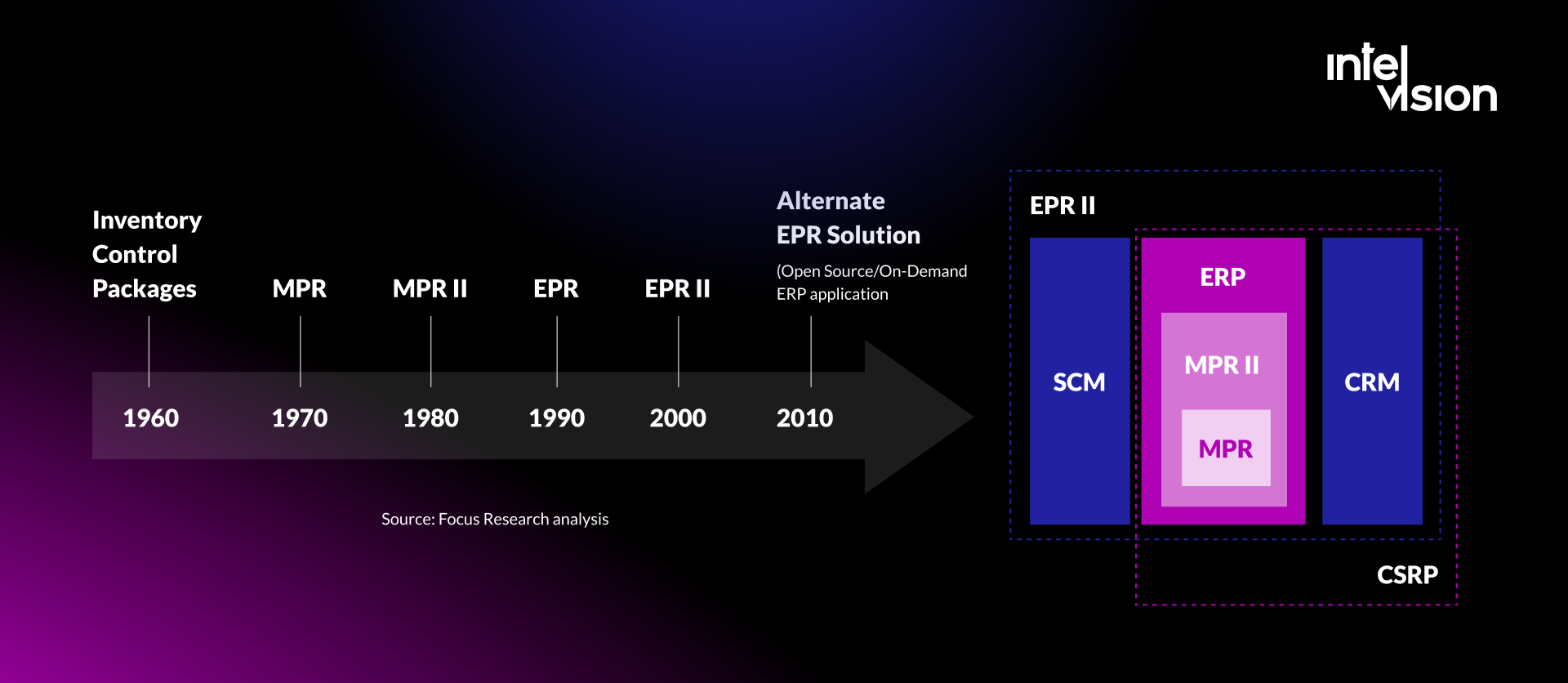
ERP systems development models
How ERP differs from accounting software, CRM and other tools
ERP in finance is often confused with other business software. An ERP is sometimes treated as a kind of CRM (customer relationship management) system, or as an alternative to accounting and tax software.
The main difference is scope: an ERP manages the resources of the whole enterprise, not one part of it. A financial management system inside an ERP:
- integrates the tasks and data of all the company's departments
- provides one shared information environment
- supports decisions across the business, not only in accounting
| Tool | Main job | Typical users |
|---|---|---|
| Accounting software | Bookkeeping, invoicing, tax returns for one entity | Small businesses, accountants |
| ERP with a finance module | Finance connected to sales, purchasing, inventory, projects and HR, across entities | Growing and established companies |
| CRM | Customers, leads, sales pipeline, service | Sales, marketing, support |
| Planning and analysis (FP&A) tools | Budgets, forecasts, scenarios | Finance and leadership |
| Business intelligence | Reports and dashboards across data sources | Everyone with reporting needs |
In practice, most companies run several of these. The ERP is the system of record for financial transactions, and the others connect to it.
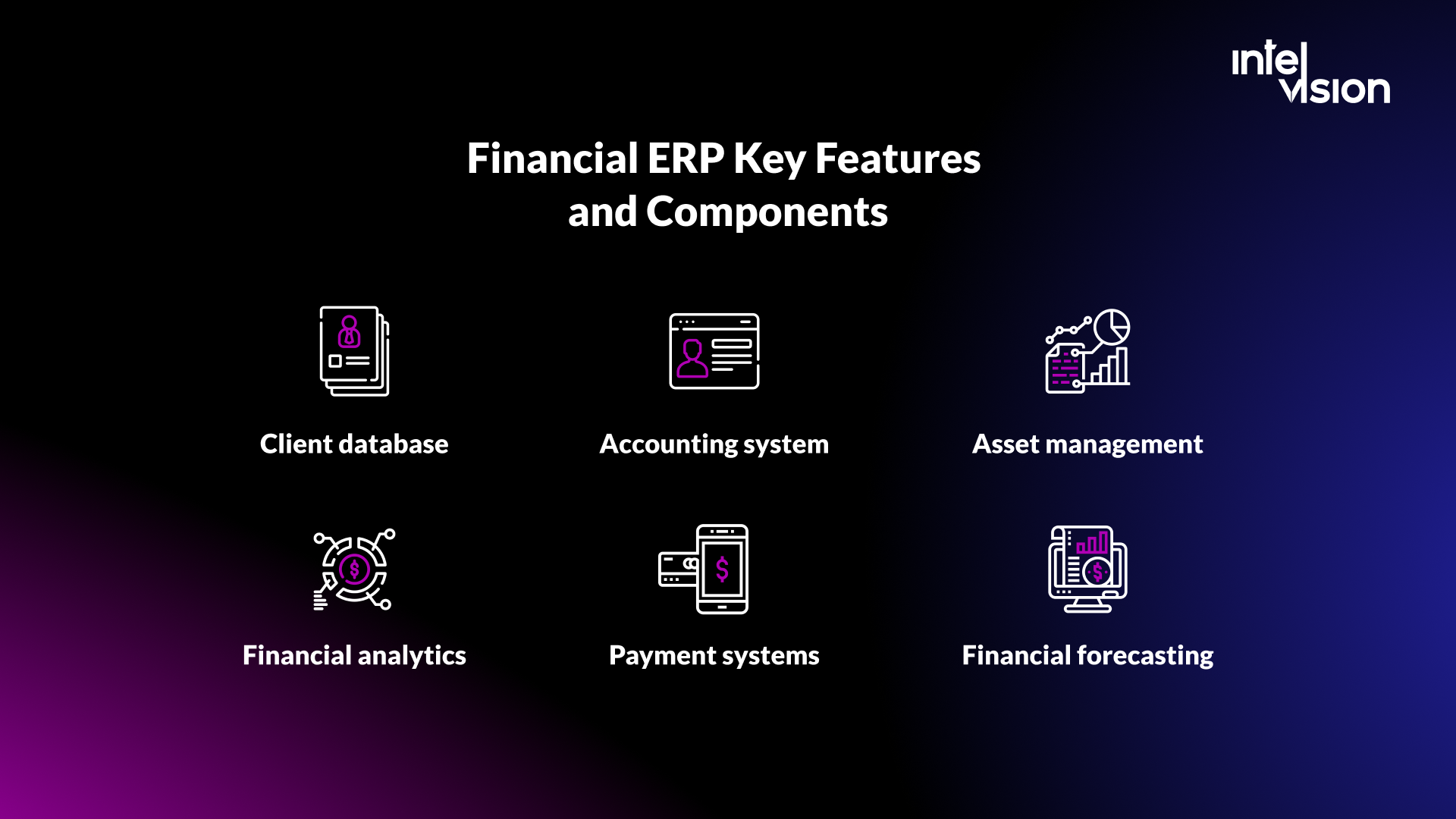
Financial ERP key features and components
Features vary between ERP solutions, but these are the components most finance teams need.
General ledger and multi-entity accounting
The ledger is the foundation: chart of accounts, journals, and in groups, several legal entities, currencies and accounting standards in one system. Intercompany transactions and eliminations should be handled by the system, not by spreadsheets.
Accounts payable and receivable, with e-invoicing
Supplier invoices, customer invoices, payment runs and dunning. In 2026, this must include sending and receiving structured e-invoices in the formats your countries require, such as those based on the European standard EN 16931, and matching them automatically against orders and receipts.
Cash and treasury management
Bank connections, cash positions, payment files and cash forecasting. With instant payments, daily bank statements are no longer enough; finance needs an intraday view.
Fixed asset management
Asset register, depreciation calculated automatically by method and book, and reports that are produced in seconds instead of rebuilt by hand.
Financial close and consolidation
Close checklists, reconciliations, accruals and group consolidation. A good system shows what is still open and who owns it, so the close becomes a managed process rather than a heroic effort.
Budgeting, planning and forecasting
Budgets and rolling forecasts based on actual data and the current situation in the company, compared with results in the same system.
Financial analytics
Real-time dashboards for receivables, payables, cash, margins and other key figures, presented clearly with visuals, and with the ability to drill down to the original transaction.
Payments
If you offer customers several payment methods, the ERP should make them easy to manage and reconcile, and keep transactions secure.
Tax, compliance and audit trail
VAT determination and reporting, retention rules, and a complete audit trail of who changed what and when. For regulated firms, role-based access and segregation of duties are essential.
Customer and supplier data
Master data for customers and suppliers, with financial transactions and balances, available to authorized staff at any time. Clean master data is also the precondition for any automation or AI.
Integrations and APIs
Connections to banks, payment providers, CRM, e-commerce, payroll, industry systems and data platforms. The quality of the APIs decides how much manual work remains between systems.
ERP financial system benefits
In short, after an ERP implementation, information flows better across the company, which reduces errors and the time spent on routine work.
Business and financial transparency
With an ERP, financial information is stored centrally and protected by access rights. That reduces the risks in the company's financial data and protects it from depending on individual people.
Automation of manual work
Mistakes are almost inevitable when documents are prepared by hand. A familiar situation: an employee spends a whole week compiling a report in Excel for a manager. The report does not reconcile, and the search for the error takes three more weeks. An ERP with automated reports reduces errors and frees that time for analysis.
The effect can be large. For a licensed payments company in the DACH region, a team we provided built a real-time transaction dashboard with audit-ready exports that cut report generation from 2 days to minutes and made anomaly response 4x faster.
Reduced workload
With an ERP, information is entered once, in the department where it originates. After that, everyone with the right permissions can use it. Departments work from the same data, and the errors that come from copying information between applications largely disappear, because the whole finance team works in one system.
Real-time analysis
With the finance module of an ERP, managers can compare plans and results in real time. That matters most in fast-changing conditions and during growth. It also saves time searching for information, because everything is in one place.
A faster close
Benchmark data from APQC, published by CFO.com, showed that, from trial balance to consolidated statements, the top quarter of organizations closed their monthly books in 4.8 days or less, the median needed 6.4 days, and the bottom quarter took 10 days or more. The data is from 2018, so treat it as a rough yardstick. APQC tied faster closes mainly to data quality: a standard chart of accounts, common financial definitions and data governance. An integrated ERP is where those rules are enforced.
Audit readiness and compliance
A complete audit trail, consistent controls and structured data make audits faster and regulatory changes, such as e-invoicing, easier to implement once instead of in every spreadsheet.
Who needs a financial ERP?
There are two classic reasons to implement an ERP:
- The business is growing. As the company grows, planning becomes more complex, which pushes managers toward specialized tools.
- Critical knowledge must belong to the company, not to individuals. If a key manager leaves, they can take important knowledge with them. A well-used ERP acts, among other things, as the company's memory.
Practical signs that you have outgrown your current setup:
- the monthly close takes more than a week and depends on a few people
- you run several legal entities or currencies and consolidate in spreadsheets
- the same data is typed into two or more systems
- auditors find the same control weaknesses year after year
- your current system cannot meet e-invoicing or reporting requirements without workarounds
- your ERP is out of mainstream support, or will be soon
Do not expect an ERP to solve every management problem, though. An ERP implementation needs clear intent, above all from the company's management.
Off-the-shelf, custom or hybrid: choosing the approach
The greatest value comes from solutions built around the needs of the business and its customers. That does not mean everything should be custom. The right answer is usually a combination:
| Approach | Fits when | Watch out for |
|---|---|---|
| Off-the-shelf cloud ERP | Standard finance processes, a need for regular compliance updates, limited IT capacity | Paying for modules you do not use; heavy configuration that blocks upgrades |
| Off-the-shelf core with custom extensions | Standard accounting, but industry-specific workflows, portals or integrations | Extensions must use supported APIs so they survive vendor updates |
| Custom-built system | Unusual business models, many entities with special reporting needs, or licenses that no longer fit | You own maintenance, security and compliance updates |
A useful rule: keep the core of accounting standard, and build custom where your business is different. The ledger, tax logic and statutory reporting change with regulation and are best maintained by a vendor. Portals, industry workflows, approval flows, reporting and integrations are where custom software earns its cost.
Sometimes custom is the cheaper option. A German single-family office running 12 companies on spreadsheets, email threads and a legacy ERP licence it could neither extend nor replace affordably worked with our Strike Team on an operating system for the portfolio. The published results: 64% of manual workload removed, all 34 critical processes documented and digitized, and a six-figure annual licence eliminated, with reports that took a day to assemble now generated in minutes.
Custom ERP-style software also fits specific operational needs. For Get Worker, a construction company in Croatia, a team we provided built an HR and ERP system integrated with the company's existing Airtable database, with web and mobile apps; the published result is 250% faster operations inside the system.
Digitalization is pointless if it does not meet a real need. If the user's problem is not fully solved, it does not matter how advanced the technology is.
How to choose a financial ERP, step by step
- Map your current processes. Record-to-report, procure-to-pay, order-to-cash, planning. Note where the manual work and the errors are.
- Define requirements and limits. Functional requirements, non-functional requirements (security, performance, availability, data residency) and constraints such as budget, timeline and internal capacity.
- Check compliance fit. E-invoicing formats and channels for your countries, your accounting standards (local GAAP, IFRS), audit and retention rules, and, for financial entities, DORA requirements for ICT providers.
- Calculate the total cost of ownership over five years. Licenses or subscriptions, implementation, data migration, integrations, training, internal time, support and upgrades.
- Run a tender with at least three options. Compare not only price but fit, partner quality and references.
- Ask for scripted demos with your own data. Give vendors your real scenarios, such as a month-end close or an intercompany invoice, rather than watching a standard demo.
- Talk to reference customers of a similar size and industry, and read independent reviews of both the product and the implementation partner.
- Negotiate the exit up front. Data export in usable formats, service levels, price increases and termination terms.
The most typical problems when implementing an ERP
Implementing an ERP is a complex process, and it often runs into the same problems. These are the ones we see most often, and how to avoid them.
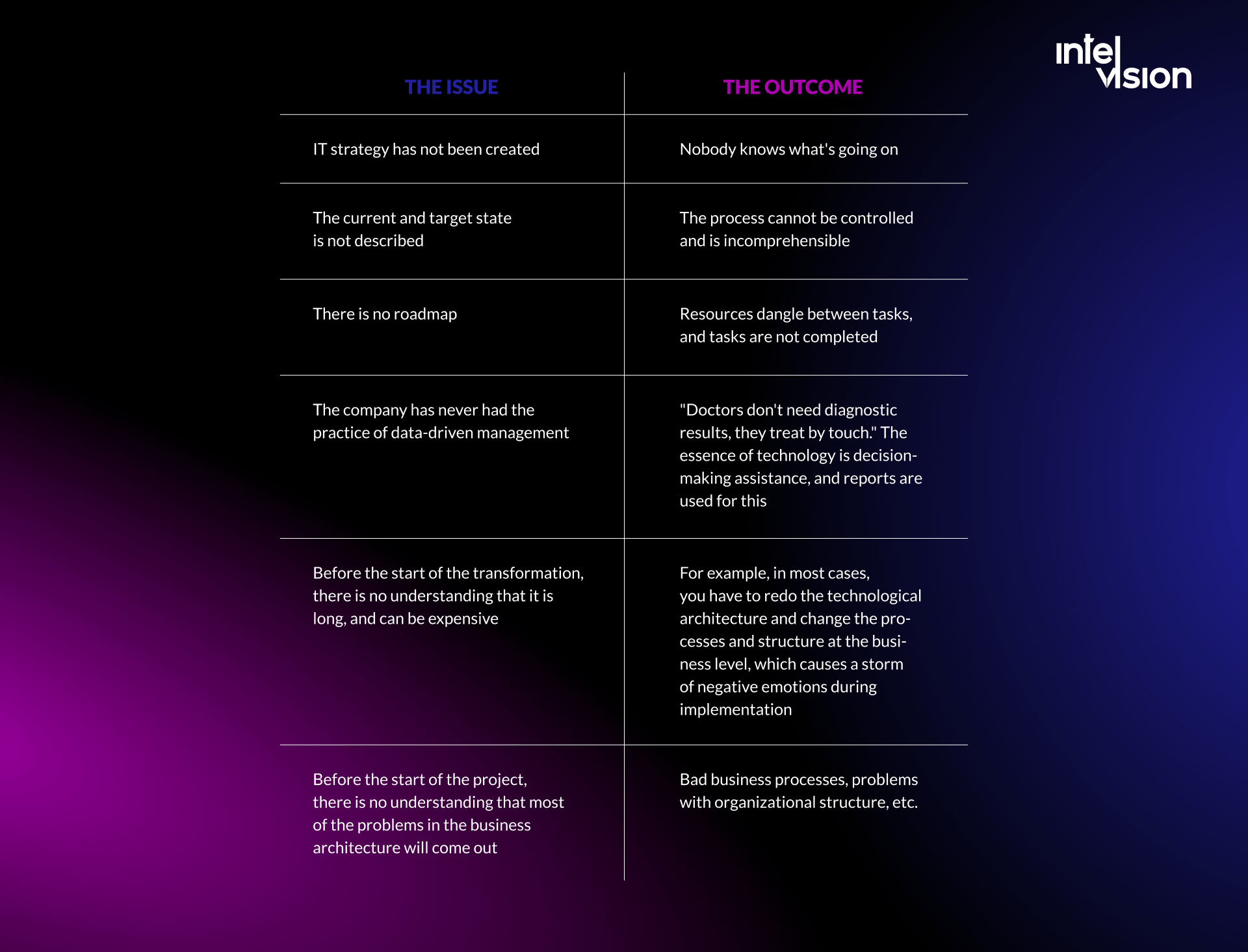
- Unclear goals. "Replace the old system" is not a goal. Define two or three measurable outcomes, such as close days or invoices processed without manual touch.
- Copying old processes into new software. Use the project to simplify. Every customization should have a business reason and an owner.
- Underestimating data migration. Old master data is usually worse than anyone thinks. Start cleaning it early and rehearse the migration more than once.
- Too little management attention. An ERP changes how people work. Without a senior sponsor who makes decisions quickly, the project stalls.
- Integrations left to the end. Banks, payment providers, CRM and industry systems are where many projects slip. Build and test them early.
- Testing too late and too little. Test full processes end to end with real users, including a simulated month-end close.
- No plan after go-live. Plan support, training and improvements for the months after launch, when most questions appear.
An ERP project needs a project manager, an architect (ideally covering both the enterprise and the solution level), business analysts, consultants for the chosen product and developers for integrations and extensions. If a project is already in trouble, with budgets and dates slipping, an independent review before you spend more usually pays for itself.
How AI is changing finance ERP
AI in finance has moved from experiments to specific tasks. In Gartner's 2025 survey, the use cases adopted by more than a third of AI-using finance teams were knowledge management (49%), accounts payable automation (37%) and error and anomaly detection (34%). These are also the areas where an ERP holds the data AI needs.
Three conditions decide whether AI works in finance:
- Clean, structured data. Gartner names weak data quality and availability among the largest obstacles. An AI model cannot fix inconsistent master data; it amplifies it.
- Human approval for anything that commits money. AI can draft, match, flag and explain. People should approve payments, postings and filings, with the decision recorded in the audit trail.
- Control over sensitive data. Financial data often cannot leave your environment. In the single-family office project above, a locally hosted language model runs extraction and classification without data leaving the network. Our private AI service builds this kind of setup.
A practical starting point is a narrow, measurable use case: matching incoming e-invoices to orders, flagging unusual transactions, or answering questions about policies and contracts from your own documents.
Financial technology trends to watch
When we first wrote this article in 2022, we listed predictions for financial innovation. Some have arrived, some are still arriving. An honest update:
- Faster processing is now regulated, not only expected. Sending instant euro payments, with verification of payee, became mandatory for euro area payment providers from 9 October 2025. Customers now expect the same speed from every financial process.
- Payments are becoming invisible. We still expect the payment step to fade from the user's view as payments are embedded in apps and connected devices. For finance teams, that means more, smaller transactions to reconcile automatically.
- Decisions rely more on data. Financial companies increasingly build a single view of each customer from their interactions. In the EU, that use of data is constrained by data protection and AI rules, so governance matters as much as the models.
- Paper keeps disappearing. E-invoicing mandates across Europe and EU digital reporting from 2030 are turning paperless finance from a goal into a legal requirement.
- Finance becomes part of other software. Financial services are increasingly built into the platforms where business happens, in the same way that paying for a ride happens inside the app. ERPs are becoming hubs that connect to these services through APIs.
How custom ERP software can help your business
We build and extend financial and operational software: custom ERP modules, accounting platform features, payment and reporting dashboards, compliance automation and the integrations between them. Examples from our published work include a real-time payments dashboard for a DACH payments company, a compliance platform for an EU digital lender that cut onboarding time from 48 hours to 2 and synchronizes with the client's ERP and CRM, and more than 30 months of continuous development by one full-stack engineer on Thrive's accounting platform for property managers.
You can work with us by adding senior engineers to your own team, by handing us a defined module or integration, or by bringing in our Strike Team when an ERP decision needs a business case or a project needs rescuing. If you are planning a move off an aging system, our migration and modernization work covers that path.
In a nutshell
An ERP for finance connects the numbers to the business that produces them. In 2026, the case for it is stronger than when we first wrote this guide: e-invoicing mandates, the end of mainstream support for a major ERP generation, instant payments and AI all reward finance teams with clean, connected data and penalize those without it.
Start with your processes and your data, not with a product. Keep the accounting core standard, build custom where your business is different, and measure the result in close days, manual touches and decisions made faster. If you want a second opinion on your plan, talk to us.
Sources
- IHK Köln: E-Rechnungen
- European Commission: VAT in the Digital Age (ViDA)
- SAP News: SAP extends its innovation commitment for SAP S/4HANA, provides clarity and choice on SAP Business Suite 7
- CPA Practice Advisor: Gartner survey shows finance AI adoption remains steady in 2025
- European Central Bank: Instant Payments Regulation
- EIOPA: Digital Operational Resilience Act (DORA)
- CFO.com: Metric of the month, cycle time for monthly close (APQC data)
Read Intelvision often? Add us as a preferred source in Google Search.
Add to preferred sources